Teams have a weekly loop: check in, read, review, adjust. Leadership needs a loop too, at a slower pace.
Once a month, someone reads the whole company's OKRs, finds the places that need a decision and puts them on one page. That page is the monthly business review, or MBR. It is the pre-read for the leadership review in weeks 4, 8 and 12.
Why leadership needs its own loop
Weekly check-ins are too detailed for a leadership team. Five teams with five Key Results each produce a hundred updates a month. A leader who reads them all either gives up by week four or starts steering every team directly.
Waiting for the end of the quarter has the opposite problem. By then nothing can be changed.
A monthly review gives three points in the quarter to do what teams cannot do for themselves: move people and budget between teams, settle a dependency between two of them, or change a target.
Read the company in fifteen minutes
Before anything is written, someone has to read. The OKR champion or whoever runs operations usually does it, and any leader can. It takes three steps, each one closer in than the last.
Step 1: Open the map
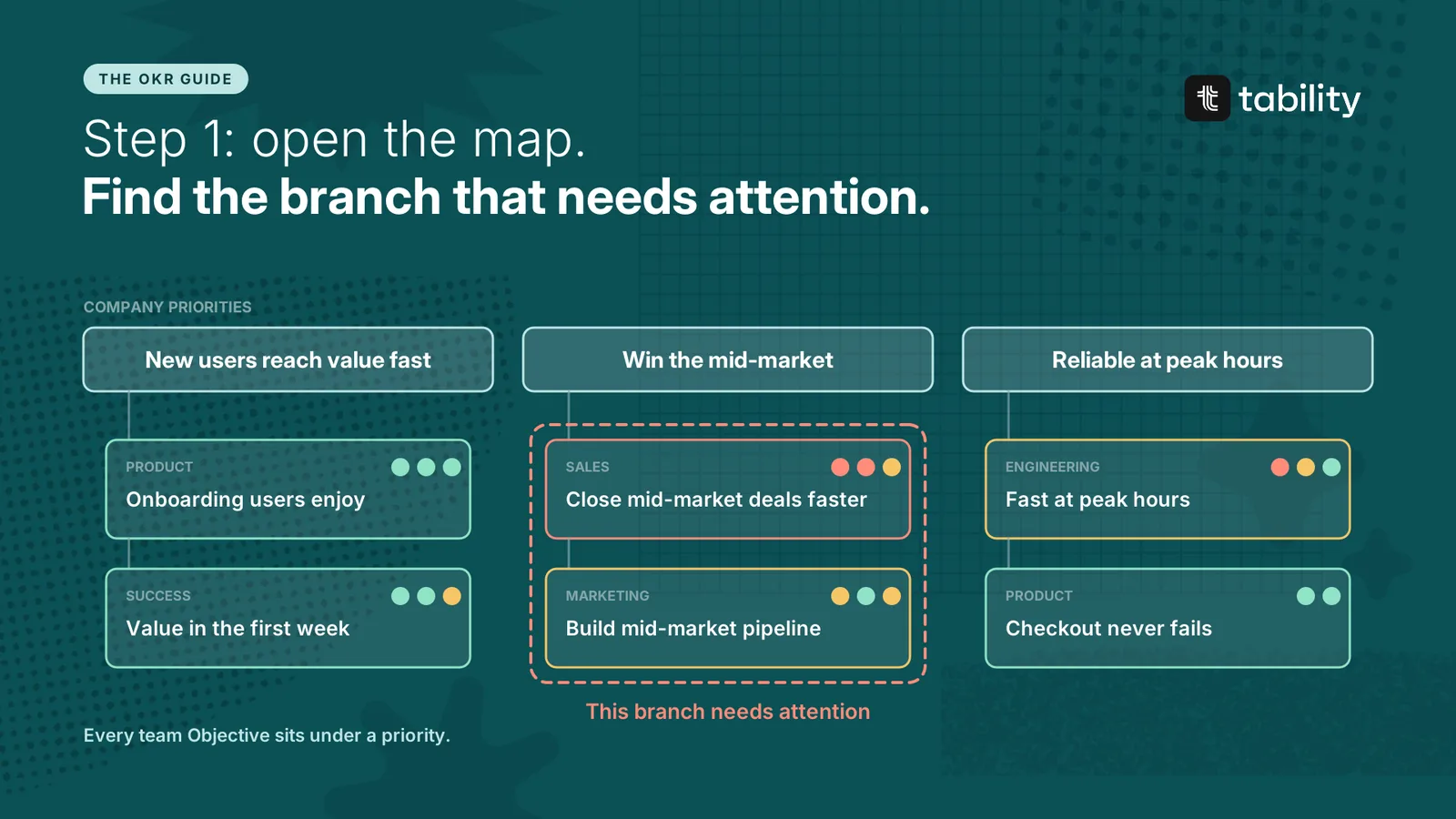
The strategy map shows the whole company on one screen: the company priorities at the top, each team's Objectives beneath the priority they support, and every item coloured by its current health.
Look for two things.
-
Objectives that connect to nothing. Either the strategy has a gap or the work should stop.
-
A branch changing colour. One red Key Result is a detail. A priority where every team underneath is yellow or red is a part of the business in trouble.
In this example, two priorities look healthy. "Win the mid-market" has a red Objective in sales and a yellow one in marketing. That is where to go next.
Step 2: Open the team
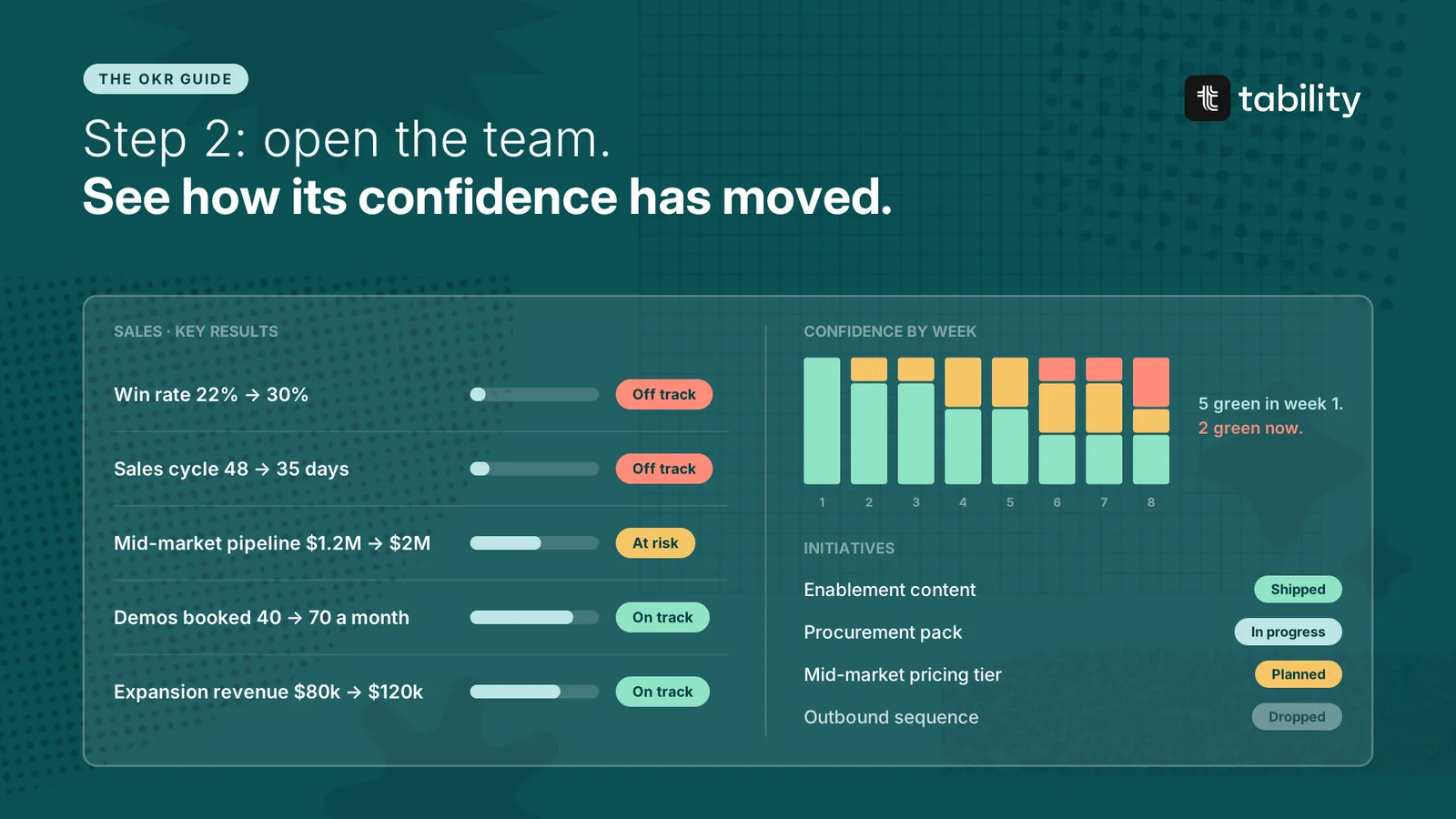
The team dashboard shows what is happening inside sales. Read it in this order.
-
The Key Results. Win rate and sales cycle are both off track.
-
Confidence by week. All five Key Results were green in week 1. Two are green now. The slide started in week 2 and nothing has reversed it.
-
The initiatives. The enablement content shipped and the numbers did not move. The pricing tier, which the owner believes is the real fix, is still only planned.
Also check that the check-ins are recent. A status that is three weeks old tells you nothing about today.
Step 3: Open the Key Result
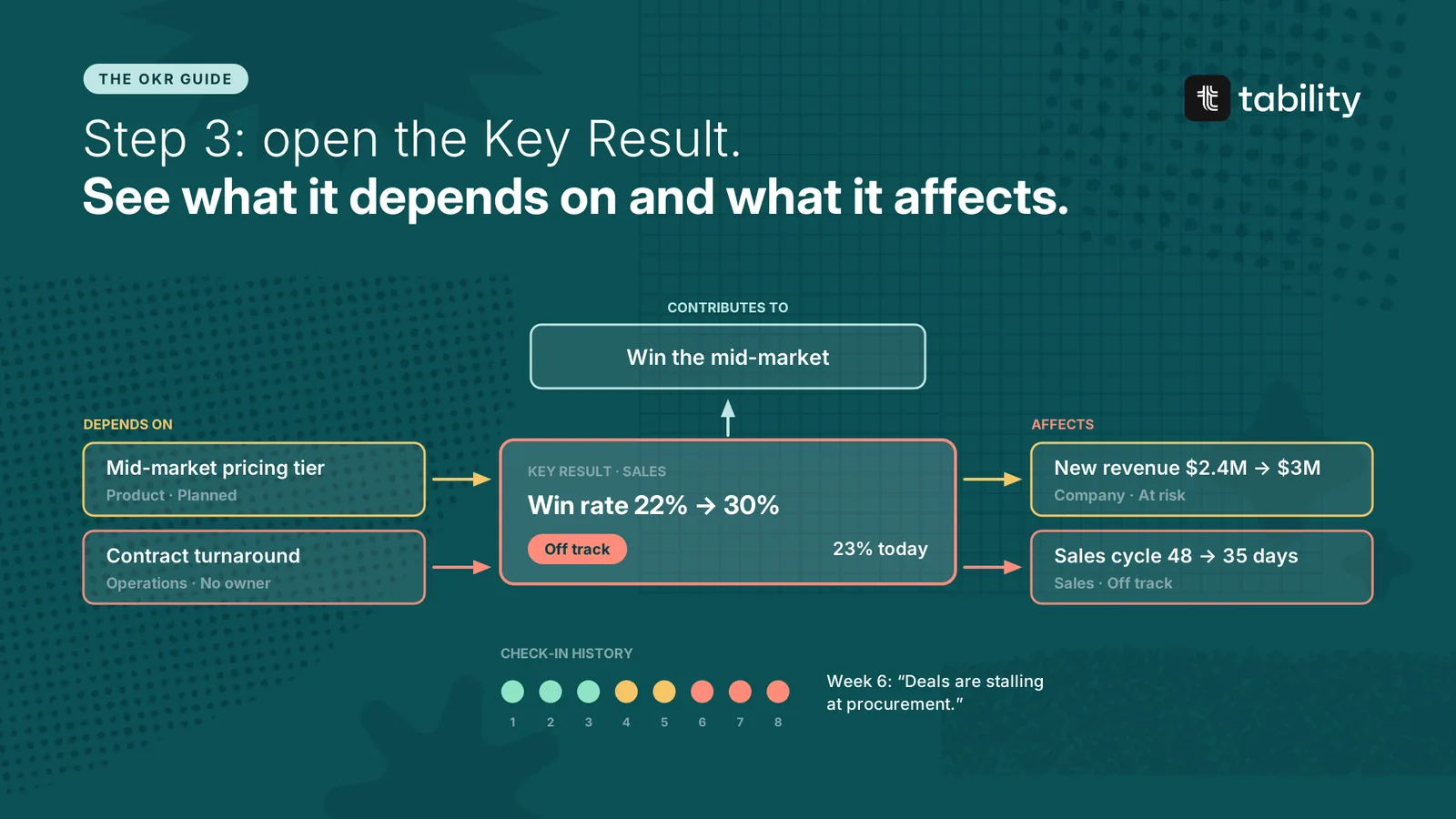
The last step puts one Key Result at the centre and shows what surrounds it.
-
What it contributes to. Win rate feeds a company priority, so a miss matters.
-
What it depends on. A pricing tier that belongs to product, and contract turnaround that nobody owns.
-
What it affects. The company revenue target and the sales cycle.
-
Its history. Yellow in week 4, red in week 6, with the owner writing that deals are stalling at procurement.
The conclusion is now clear. Win rate cannot be fixed inside the sales team, because both of its blockers sit elsewhere. That makes it an item for leadership.
Repeat the three steps for each branch that stands out. Most months produce two or three items.
Write the one-page review
The review has five sections, in this order.
-
Confidence. How many Key Results are on track, at risk and off track, and how that has moved since last month.
-
What changed. The Key Results that changed status, with the reason.
-
Decisions needed. Each one stated as a choice, with an owner.
-
Wins. Targets hit and bets that worked.
-
KPIs to note. Any health metric that has left its range.
Everything in it comes from the weekly check-ins. Key Result owners have already written what changed and what they need, so preparing the review is mostly selection.
Example: monthly business review, end of week 8
Confidence. 24 Key Results: 15 on track, 6 at risk, 3 off track. Net confidence is +50, down from +67 last month.
What changed
-
Win rate moved to red after two yellows. It is at 23% against a target of 30%. Mid-market deals are stalling at procurement.
-
Sales cycle moved to red. It is at 46 days against a target of 35. Contract review is taking two weeks.
-
Peak load time moved to red. The caching work took it from 4.2s to 3.1s, short of the 1.5s target.
-
Activation moved from yellow to green. It is at 44% and ahead of pace after the setup checklist went live.
Decisions needed
-
Approve a mid-market pricing tier, or accept that win rate will end near 24%. Owner: Head of Sales.
-
Give contract review an owner and a fixed turnaround for deals under $50k. Owner: COO.
-
Move one engineer from the status page to load performance for three weeks. Owner: Head of Engineering.
Wins. Organic sign-ups passed 250 a month, four weeks ahead of plan. Week-1 retention reached its target of 60%.
KPIs to note. Churn 2.1%, in range. Uptime 99.95%, in range. Support response time 3.4 hours, above the 3-hour limit for the second month.
The fifteen green Key Results get one line between them. Send the page two days before the meeting so that everyone arrives having read it.
Bring the decisions to the leadership review
The meeting itself follows the review format: everyone has read the page, greens are skipped and the time goes to the decisions.
Three kinds of decision belong at this level.
-
Moving people or budget between teams. A team can change its own bets. It cannot borrow an engineer from another team.
-
Settling a dependency. When one team's Key Result waits on another team's roadmap, someone above both has to set the order.
-
Changing a target or a priority. Rare, and only with the reasons written down.
Record each decision next to the Key Result it concerns. The owner's next check-in starts from there.
Keep one screen for leadership between reviews
The review is a monthly snapshot. Between reviews, a leadership dashboard answers "where do we stand?" at any time, without anyone preparing anything.
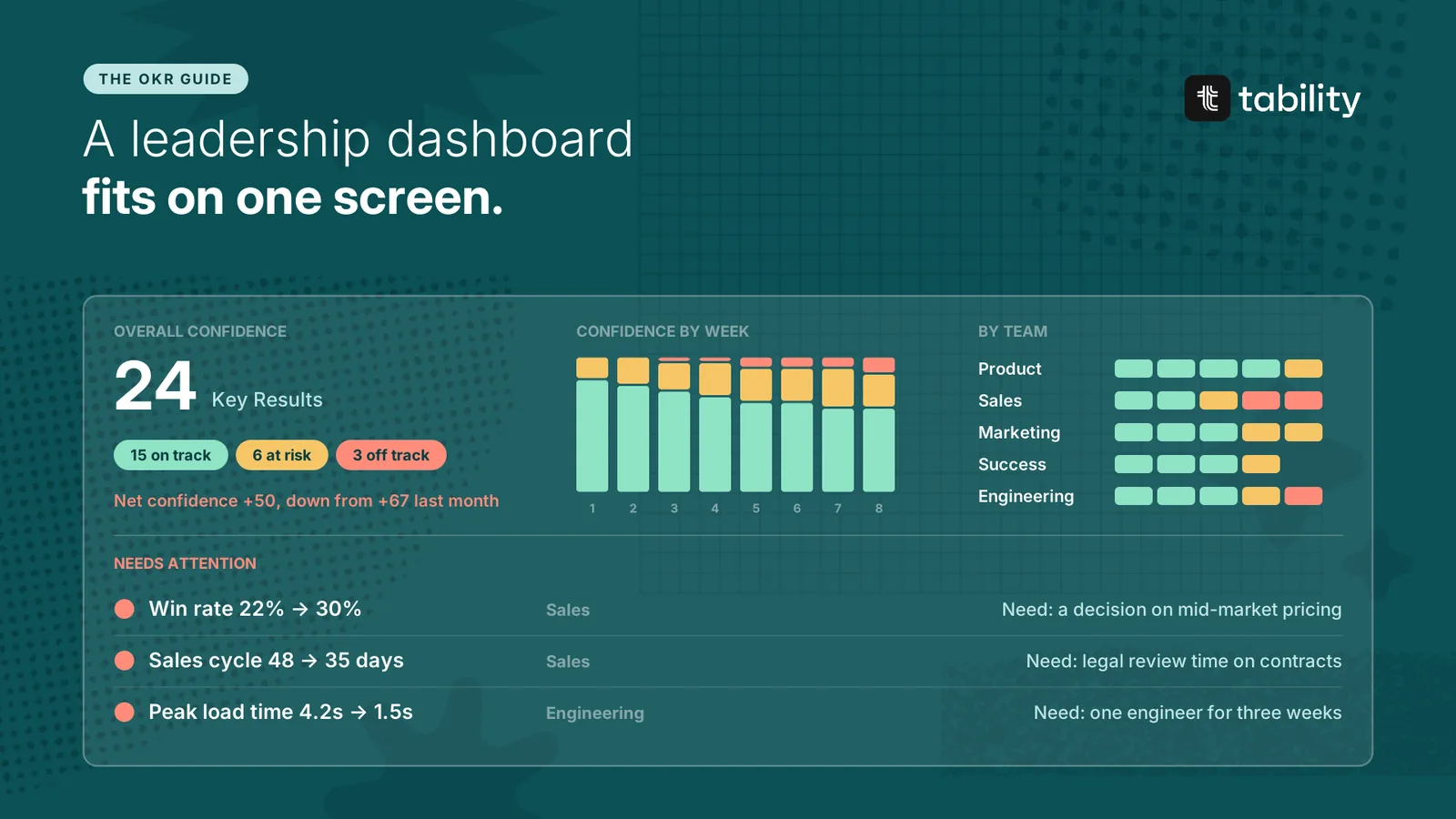
It needs four blocks and fits on one screen.
-
Overall confidence. The split between on track, at risk and off track, with one summary number such as the Net Confidence Score.
-
Confidence by week. The direction matters more than today's value.
-
Confidence by team. Where the reds and yellows are concentrated.
-
Needs attention. Key Results that are red or have been yellow twice, with the owner's ask beside each.
For more dashboard layouts, see Great OKR dashboards will boost execution.
Rules for the monthly review
Build it from the check-ins. If the review needs information that is not in them, improve the check-ins.
Report by exception. Leadership needs the reds, the repeated yellows and the asks.
State every decision as a choice. "Approve the pricing tier, or accept a win rate near 24%" can be decided. "Win rate is a concern" cannot.
No surprises. If leadership first hears about a red in the monthly review, the weekly loop is broken somewhere below.
Same format every month. Readers learn where to look, and the page takes less time to prepare.
Questions about monthly business reviews
What is a monthly business review? A one-page summary of where the company stands against its goals, prepared each month for the leadership team, with the decisions it needs to make.
How long should an MBR be? One page to read. Forty-five minutes to an hour to discuss.
Who prepares it? The OKR champion, chief of staff or head of operations, using what Key Result owners wrote in their check-ins.
How is it different from the weekly review? The weekly review is run by a team and changes that team's plan for the week. The monthly review is run by leadership and covers what teams cannot decide alone.
What is the difference between an MBR and a QBR? The monthly review looks at exceptions during the quarter. The quarterly business review looks at final results and what changes next quarter. See OKR planning for an example.