A weekly check-in has three parts: the number, the owner's confidence and a short note. An agent connected to the right systems can produce all three. Whether it should depends on the Key Result.
Tracking remains a human responsibility. This chapter covers how much of the work to hand over for each Key Result, and the safeguards that have to be in place before you do.
What an agent can do with each part
| Part of the check-in | What an agent can do | What it cannot know |
|---|---|---|
| The number | Pull it from the source on a schedule | Whether the source is measuring the right thing |
| The note | Summarise what changed from tickets, commits, deals and messages | What happened in conversations it has no access to |
| The confidence | Compare the trend with the pace needed and propose a status | What the owner knows is coming |
Three ways to write a check-in
Decide for each Key Result, and revisit the decision each quarter.
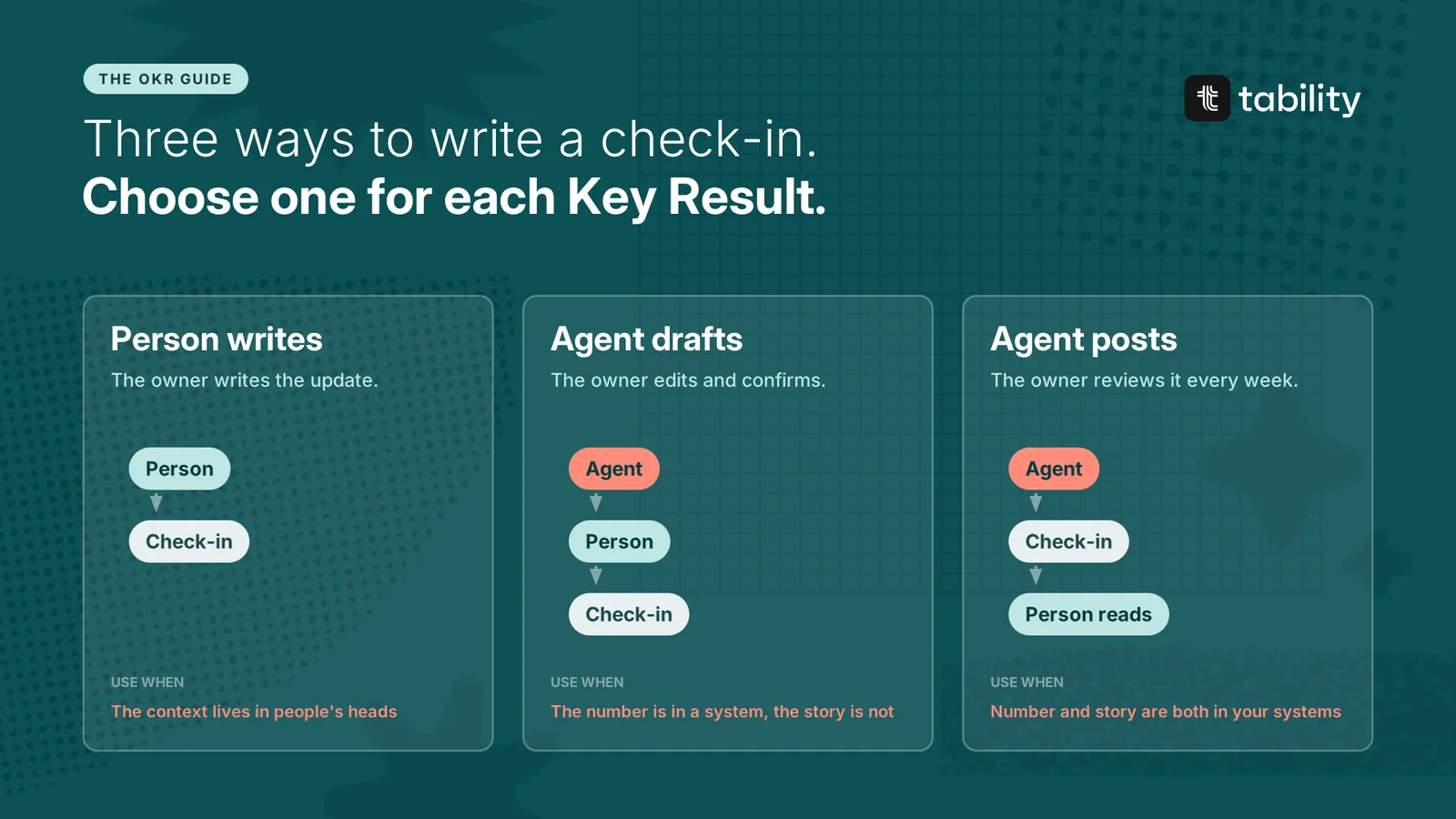
A person writes it. Use this when the story lives in people's heads: a partnership negotiation, a hiring goal, anything that depends on conversations. An agent can still pull the number so the owner starts from current data.
An agent drafts, the owner confirms. Use this when the number is in a system and the story is only partly there. The agent prepares the update, and the owner corrects it, sets the confidence and posts it. This takes the owner a minute where it used to take five, and it is the right default for most Key Results.
An agent posts, the owner reviews. Use this when both the number and the explanation are in your systems. Sign-ups, response times and uptime are typical. The update is posted on schedule, and the owner reads it before the review like everyone else.
Move a Key Result from the second mode to the third when the owner has gone three or four weeks without changing the draft.
What a good agent update looks like
Win rate 23%, up from 22%. At risk. Six mid-market deals have been at the procurement stage for more than 20 days. The pricing page shipped on Tuesday, and no deals have closed since. At the current pace the quarter ends near 25% against a target of 30%.
Sources: CRM pipeline report, repository. Written by the sales agent. Not yet confirmed by the owner.
Three things make it trustworthy.
-
It names its sources. A reader can check where each statement came from.
-
It is labelled. Everyone can see an agent wrote it and whether a person has confirmed it.
-
It checks the status against the trend. Agents are good at the chart test: they do not round a flat line up to green.
The safeguards
Automated updates fail in one particular way. The numbers flow, the notes get written, every Key Result has a fresh check-in, and nobody reads any of it. The company looks well tracked and has stopped paying attention. A wrong update usually gets caught. An unread one never does.
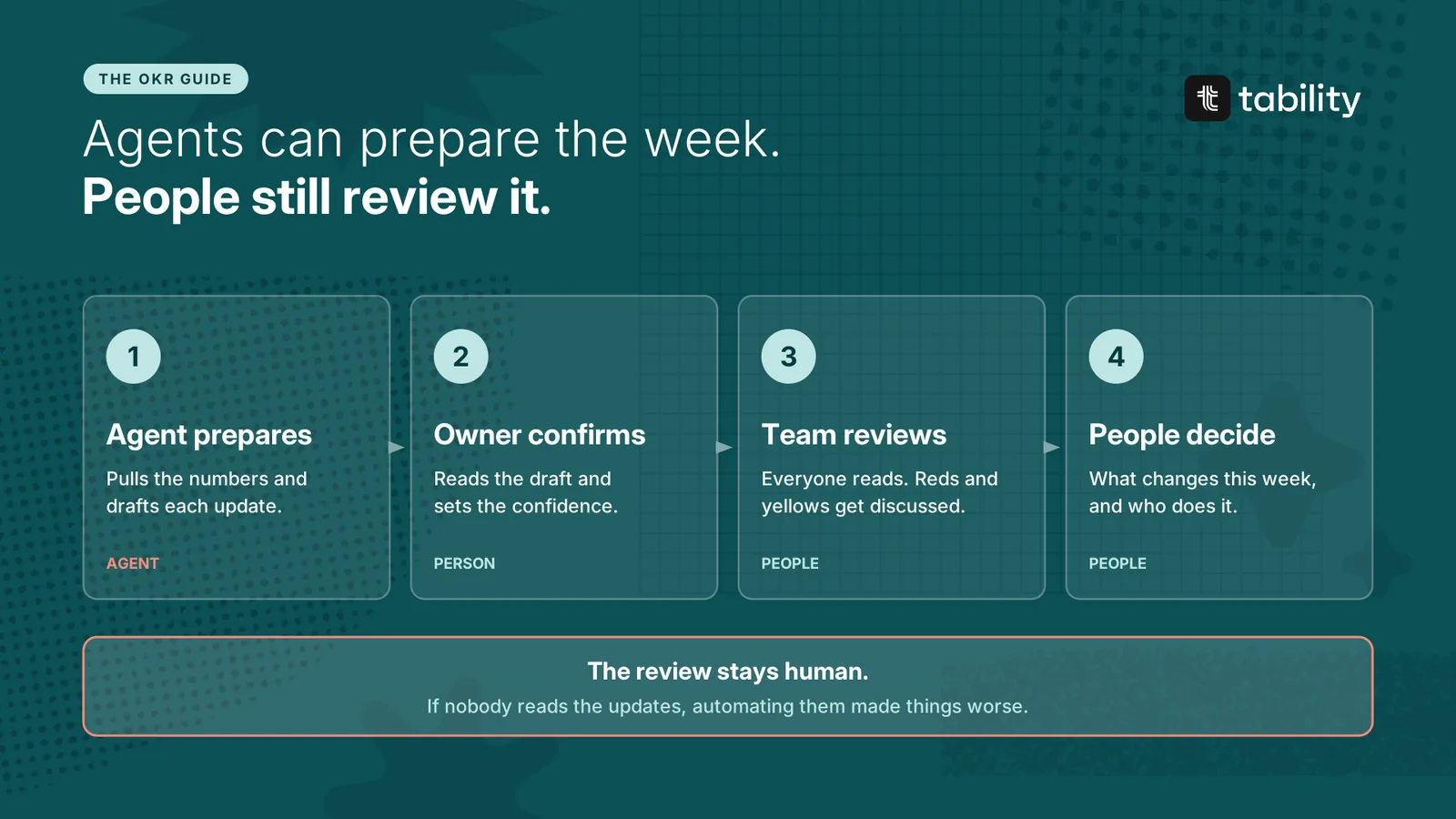
Five rules prevent that.
-
The review stays human. People read the updates before the weekly review and discuss the reds and yellows in it. If you automate the writing and drop the reading, OKRs stop being useful. This is the rule the others depend on.
-
Every Key Result keeps a named person as owner. The agent reports. The owner answers for the result.
-
Agent updates are labelled and show their sources.
-
Agents flag, people decide. An agent can propose a status and raise a risk. Changing a target, closing a Key Result or dropping a goal is done by a person.
-
Owners spot-check. Once a month, the owner compares an agent's update with the source and with what they know. Any surprise moves the Key Result back to draft mode.
The two-yellows rule applies as before. An agent that reports yellow for the third week running should be prompted to choose, and the owner makes the call.
Giving agents work as well as reporting
The same structure applies when an agent carries out an initiative. Treat it as you would a capable contractor who was not in the planning meeting.
-
Give it the goal. Link the agent to the Key Result its work is meant to move, so it can read the target and the current state.
-
Give it a supervisor. One named person reviews the output and is accountable for it.
-
Give it a reporting rhythm. The agent posts progress on its initiative on the same schedule as everyone else.
-
Review the output. Sample what it produces. Raise the sampling rate after any mistake.
An agent's initiative gets judged like any other bet: by whether the Key Result moved.
Who does what
| Task | Agent | Person |
|---|---|---|
| Pull the number | Yes | |
| Draft the note | Yes | Corrects it |
| Propose a status | Yes | Confirms or changes it |
| Post a check-in | In delegated mode | Reviews it |
| Flag a risk | Yes | Decides what to do |
| Carry out an initiative | Yes | Supervises |
| Change a target | Yes | |
| Close a Key Result | Reports the final number | Calls the outcome and writes the lesson |
| Decide in the review | Yes |
How this works in Tability
Tability supports these modes in two ways. The built-in OKR agent connects to a data source and logs check-ins on a schedule. An external assistant such as Claude or ChatGPT can do the same through the Tability MCP server, combining OKR data with your other tools. Agentic OKRs describes both, and the next chapter covers the connection.
Questions about automated check-ins
Should OKR check-ins be automated? Partly. Automate collecting the number and drafting the note wherever the data exists. Keep a person as the owner, and keep people reading the updates.
Which Key Results are safe to automate fully? Those where the number and the explanation both come from connected systems, and where the owner has stopped needing to correct the drafts.
What is the risk of automating OKR updates? That nobody reads them. Updates that arrive without effort are easy to ignore, so the weekly review has to stay.
Can an agent own a Key Result? An agent can do the tracking and much of the work. A person remains the accountable owner.