

The worst moment in a QBR isn't bad news. It's bad news you're hearing for the first time.
A goal has been quietly off track for six weeks, three layers down, and now you're learning about it in front of your peers and your boss. Your options at that point are all bad: explain it, defend it, or pretend it was the plan all along.
Fixing this doesn't take more meetings or more dashboards. It takes better signal, earlier, with enough context to act on. The most useful unlock of the past year has been AI applied properly to the data you already have.
Here are three ways Tability puts AI to work before your next QBR.
What's Tability?
Tability is where human-agent teams work on goals together. Leadership sets the direction. People and AI agents pick up the work. Everyone stays in the loop on what's moving and what isn't.
That changes what's possible in a senior leader's week. The three workflows below are some of the most useful examples.
1. Get a Monday brief that writes itself with Scheduled Prompts
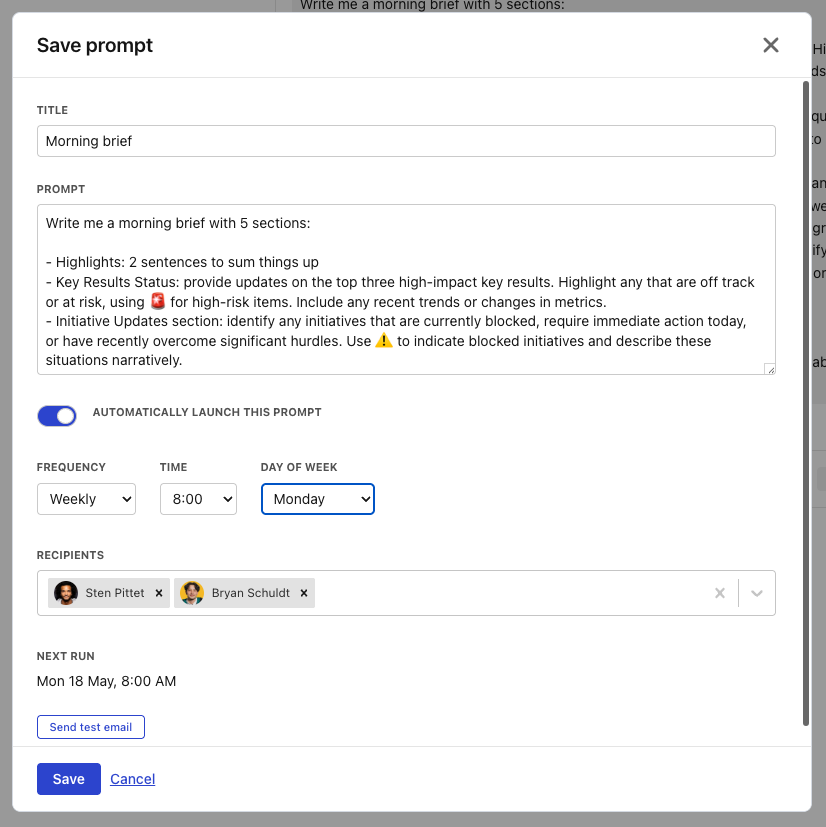
The weekly Monday brief is one of the most valuable artefacts in a leadership team. The problem is how it gets made. Usually a chief of staff, an EA, or the leader themselves spends part of Sunday or early Monday morning pulling numbers from a spreadsheet, hunting through Slack threads, and stitching it all into a doc.
It's slow. It doesn't scale. And because one person is writing it for the whole leadership team, everyone ends up with the same generic summary instead of the brief they actually need.
Scheduled Prompts fix that on three fronts.
Each leader can write their own brief in plain English. The CRO wants pipeline coverage and at-risk deals. The CFO wants cash burn and forecast variance. The CEO wants the cross-functional view. No one has to compromise on what they see.
A chief of staff or ops lead can design prompts once and route them to the right recipients. The expertise sits in one place. The personalisation sits with each leader.
And the brief itself is written by AI on the spot, against live plan data, in seconds. No one is up at 6am copying numbers. The time that used to go into writing the brief goes into acting on it.
Here's an example of a prompt one of our customers runs every Monday:
Write me a morning brief with five sections:

- Highlights: 2 sentences summing things up
- Key Results: top 3 high-impact KRs, flag at-risk ones with 🚨
- Initiatives: anything blocked, needing action today, or recently unblocked. Use ⚠️ for blockers
- Metrics: current trends in sales, retention, and CSAT. Call out significant week-over-week changes with 📊
- People: who I should reach out to today and why

Write it as narrative prose suitable for email. No tables. Bold, links, and lists are fine.
That prompt runs every Monday at 7am. The brief lands in their inbox, ready to read with coffee.
2. Skip the dashboards and just ask with AI Mode
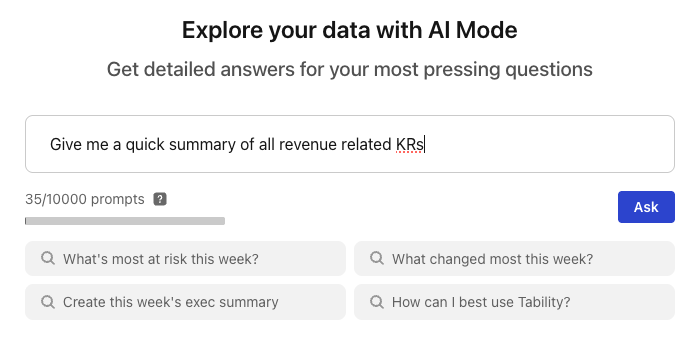
You're heads-down on something when a Slack message from your boss pops up.
Quick one, how's the activation KR tracking? Got a sec to chat in 15?
You don't have the number. You knew it three weeks ago. You half-remember it being yellow, but you also half-remember someone updating it last Thursday. You have fifteen minutes, and you need to come in with the actual answer, not a hedge.
The old version of this moment is bad. You open the OKR tool, try to remember which plan holds the right outcome, get the wrong filter applied, miss the right view, find the number eventually but burn ten of your fifteen minutes. Or you ping someone on your team and hope they're at their desk.
This kind of question hits a director or GM multiple times a week. From their boss. From a peer in another function. From a skip-level in a 1:1. From their own staff meeting where they're expected to have the answer ready. The cumulative tax on a senior leader's week is enormous, and most of it is just data retrieval.
AI Mode skips the whole thing. The question you'd ask your chief of staff is the same question you type into Tability.
How is the activation KR tracking?
You get a synthesised answer pulled from live plan data, in seconds. "Activation at 71% of target, trending down two weeks in a row, owner is Sarah, last check-in flagged a drop in trial-to-paid conversion". Done. You have your answer with twelve minutes to spare and something useful to say in the meeting.
This is the part most OKR tools get wrong. They assume you'll learn everything about the interface. Views, filters, and reports are great when you've got time set aside for a proper review. But quite often, you won't. You'll need an answer in fifteen minutes, between two meetings, while your inbox keeps filling up. In those moments, AI Mode will be the fastest way to get an answer.
3. Bring your OKRs into Claude with the Tability MCP server
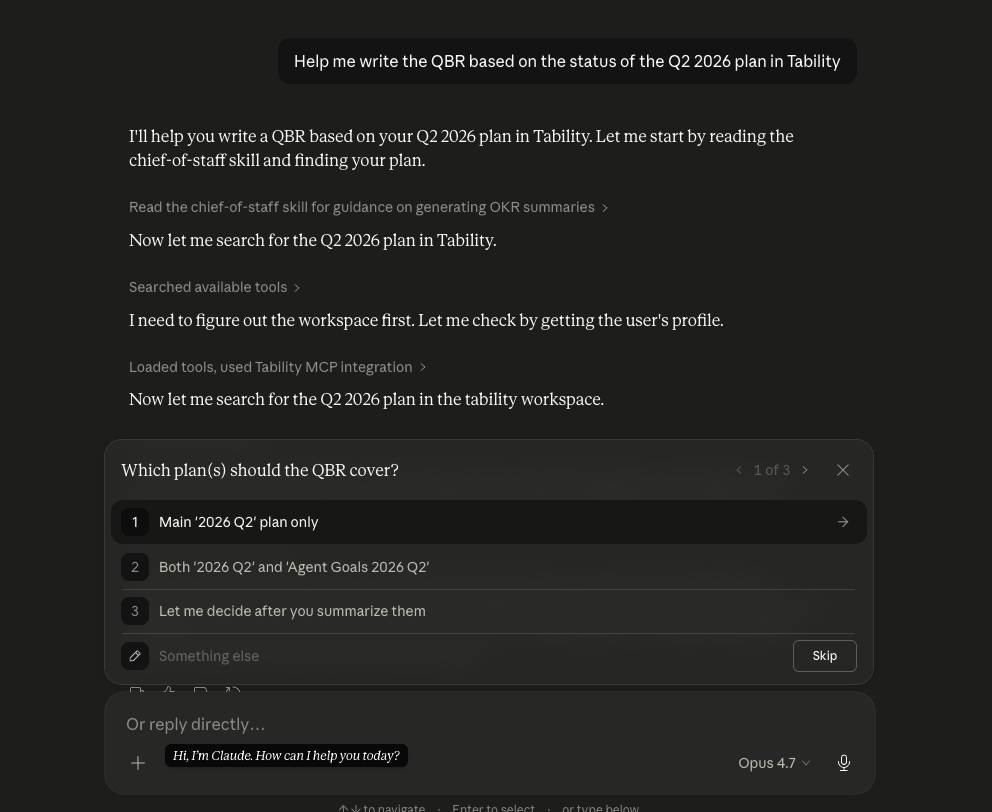
It's Thursday afternoon. You're in Claude drafting your weekly update for your manager. You've got the narrative flowing, what your team shipped this week, what's coming up, what you're worried about. The doc is coming together.
And then you hit the moment.
You need the real numbers. Actual progress on the two KRs you committed to last sprint. Actual status of the cross-team initiative you're partly accountable for. Actual data, not your gut feel from Tuesday.
So you stop. Switch to Tability. Find the right plan. Copy the figures. Switch back. By the time you're in Claude again, the thread of what you were writing is gone, and you spend the next ten minutes recovering momentum.
That moment isn't rare. It happens every time you draft a weekly update, prep notes for a 1:1, write a Slack message to your team about priorities, or pull together a quick memo for an offsite. Several times a week. Sometimes several times a day.
The Tability MCP server kills that moment. Connect Tability to Claude once, and your OKR data is available wherever you're already working. Drafting your weekly update? The numbers are right there. Writing a note to your team about Q3 priorities? Same. Prepping for a 1:1 with a direct whose project is slipping? Claude has the context before you even ask.
It also goes the other way. Spot something off in a check-in while you're reading? Add a comment or change a status without switching tabs. The AI you already use becomes the front door to your goals, in both directions.
The pattern
Catching problems early isn't about having more data. It's about getting the right answer at the right moment, in the place where you're already working.
That's what AI changes. The brief lands before you ask for it. The answer arrives faster than you could find it. The numbers are already in the doc you're writing. The work of pulling and stitching and reformatting goes away, and what's left is the part that actually matters: deciding what to do about it.
Your next QBR will go better when fewer things are surprises.
If you want to see any of this in action, start a free Tability trial.

.jpg)
.png)