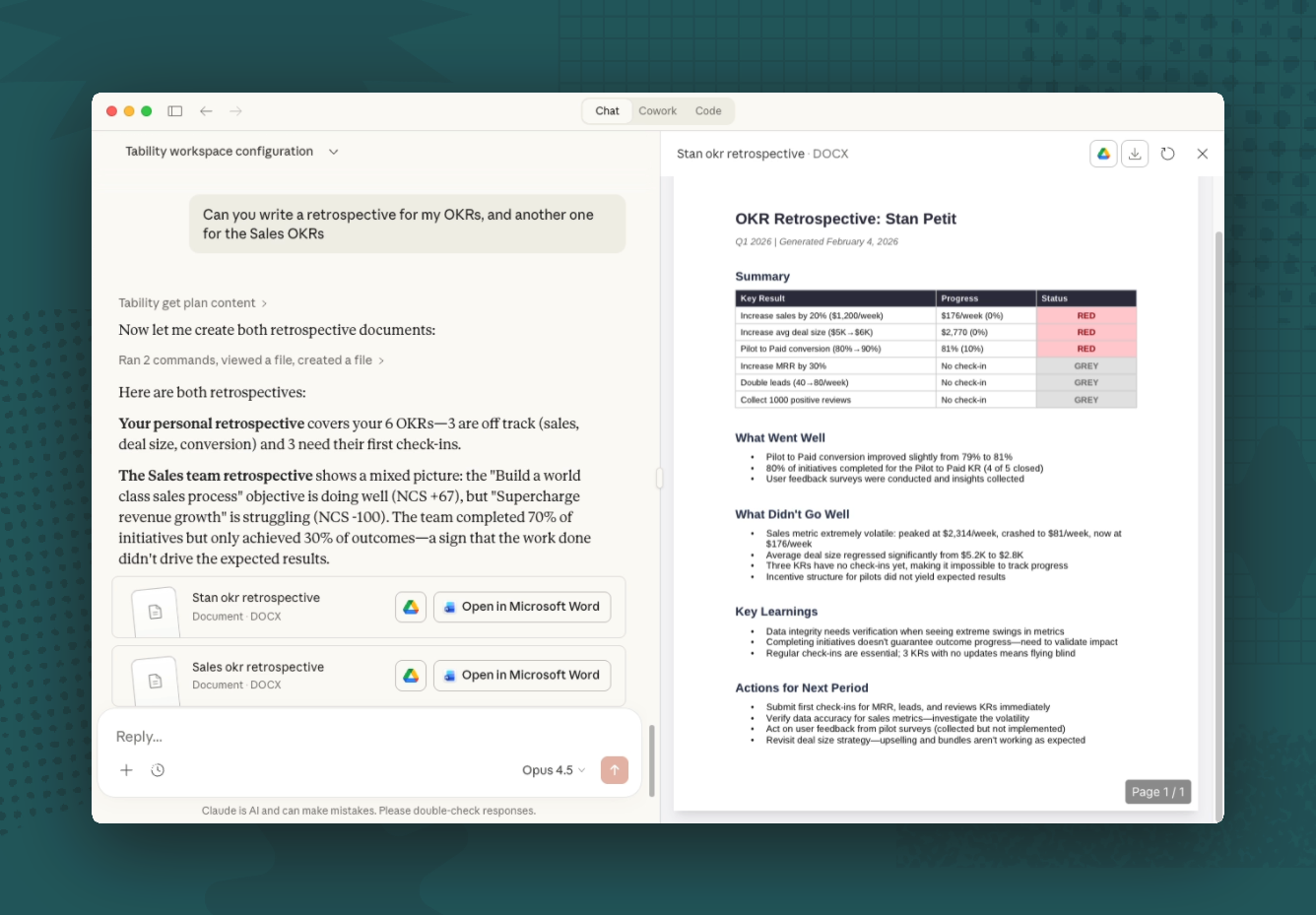
LLMs have completely changed the way we work. I personally use ChatGPT everyday and I can easily say that I’m at least 10x more productive than before.
But, one thing was missing to make it 100x. Being able to talk to our data directly from ChatGPT or Claude.
This is now possible with our new Tability MCP Server.
In a rush? Just check the docs here.
What is an MCP Server?
MCP stands for Model Context Protocol. Behind the scary acronym is an open standard created by Anthropic, to tell AI assistants how to connect to external tools and data sources. Think of it as a small dictionary that teaches tools like Claude, ChatGPT, Copilot how to talk to other apps.
Before MCP, if you wanted an AI assistant to interact with a tool, someone had to build a custom integration for each combination of AI + app.
That's a lot of connectors to maintain.
MCP simplifies this by creating a single standard that everyone can build on. You build one MCP server for your app, and it works with any AI client that supports the protocol.
Why does MCP matter for OKRs?
If you've used OKRs for any amount of time, you know that the real value isn't in setting goals – it's in the weekly habit of checking progress, spotting risks, and making adjustments.
I’m a visual person and I tend to rely a lot on the OKR dashboards and charts that are in Tability. This works really well when you focus on a single team, but it can quickly get complicated if you want to cross reference data across multiple groups, or if you want to pull information that isn’t perfectly labelled (eg: finding all the revenue related KRs – they won’t always have the word “revenue” in them).
MCP changes the interaction model. Instead of navigating to the right dashboard to find what you need, you can just ask. Your AI assistant has direct access to your plans, OKRs, check-ins, and initiatives. It can pull data, filter it, cross-reference it, and present it however you need.
This matters because the people who most need OKR insights are usually the ones with the least time to dig through dashboards.
They want answers, not navigation. And that's exactly what a conversational interface gives you.
There's something else worth mentioning. We've always believed that the best OKR process is one that feels lightweight. The more friction there is in getting value from your goals, the less likely people are to stick with them.
An MCP connection means your OKR data can live wherever your thinking already happens.
OKRs x AI use cases
If you want to see it in action, you can watch this video of me using Tability’s MCP Server with Claude.
And below, I thought I’d illustrate a few use cases to show you what
Use case 1: Get board-ready updates in seconds, not hours
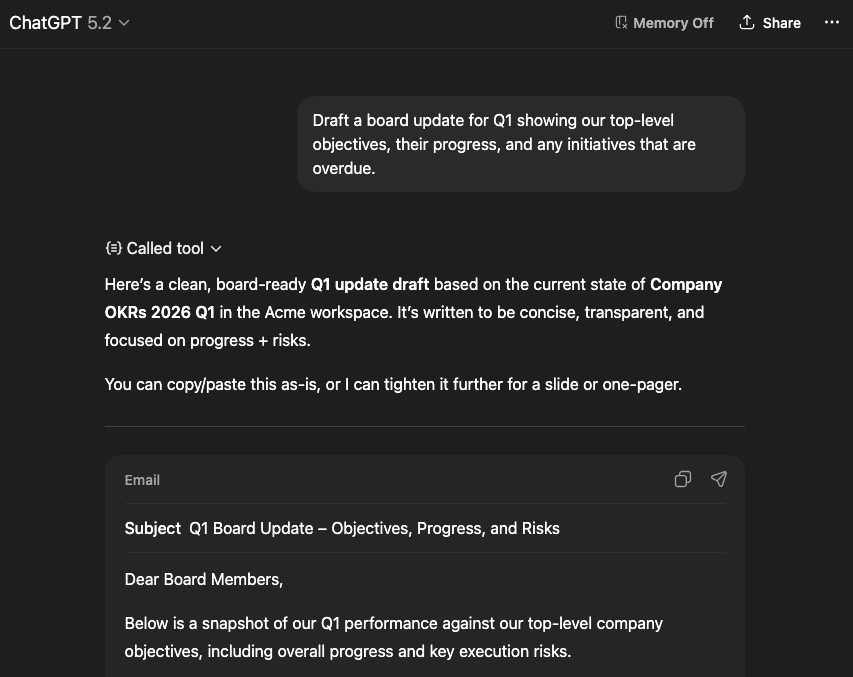
This is the one that gets people excited the fastest. Every leadership team has their own preferred format for progress updates — some want a brief exec summary, others want a detailed breakdown by team, and some want a specific focus on at-risk items.
With the Tability MCP Server, you can ask Claude or ChatGPT to pull your OKR data and format it however you want. For example:
- "Give me a summary of all red and yellow outcomes across our active plans, grouped by team, with the latest check-in notes for each."
- "Draft a board update for Q1 showing our top-level objectives, their progress, and any initiatives that are overdue."
- "Create a weekly update email for my team that highlights what moved forward this week and what's stuck."
The AI fetches the live data from Tability, structures it into the format you described, and gives you something you can send or share right away. What used to take 30-60 minutes of dashboard browsing and copy-pasting can happen in a single prompt.
Use case 2: Spot risks across teams without opening a single dashboard
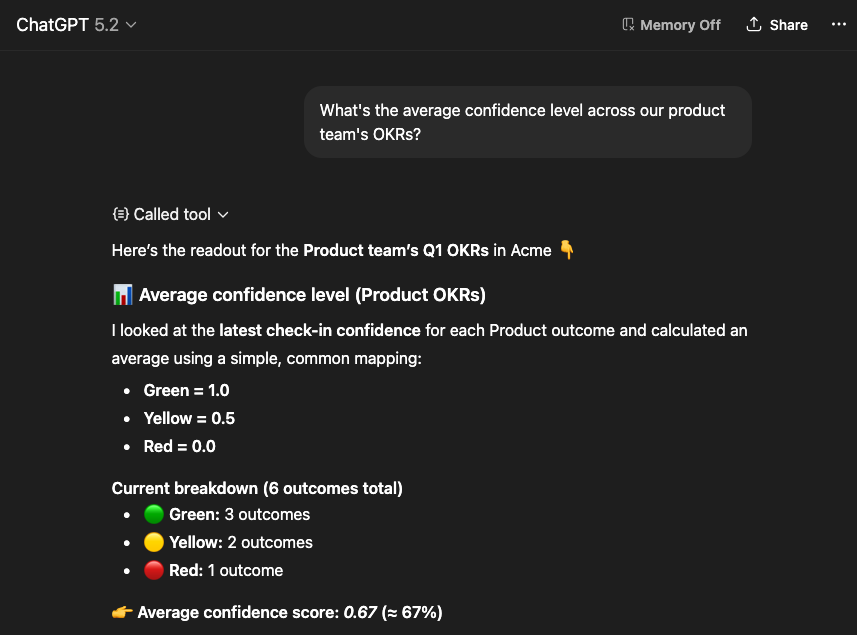
Tability already gives you a lot of dashboards and views to monitor your goals. But sometimes you need to slice the data in a way that isn't covered by a pre-built view. That's where a conversational interface shines.
You can ask questions like:
- "Which outcomes don't have an owner assigned yet?"
- "Show me all initiatives that are overdue and still open."
- "What's the average confidence level across our engineering team's OKRs?"
- "List all key results that haven't had a check-in in the past two weeks."
It's like having a really fast analyst on hand who knows your entire OKR structure. The AI handles the filtering, the cross-referencing, and the calculations, and gives you a clean answer. No SQL, no spreadsheet formulas, no context switching.
Use case 3: Plan next quarter with full context on what worked (and what didn't)
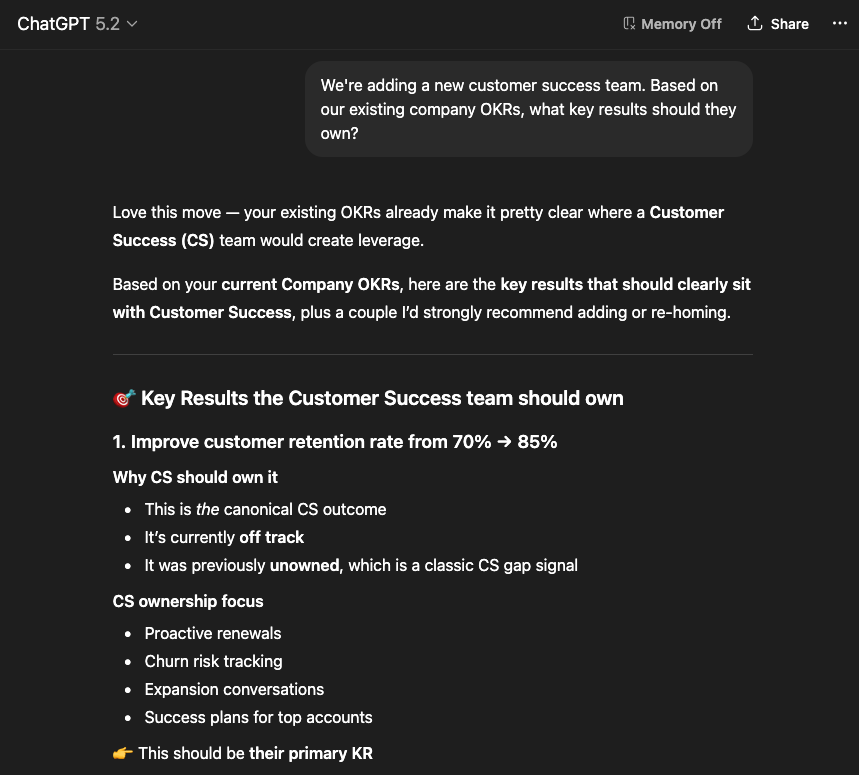
One of the hardest parts of the OKR process is writing good goals in the first place. We've been solving this inside Tability with our goal-setting AI for a while now, but the MCP connection opens up an interesting new angle: you can brainstorm new goals while looking at your existing data.
For example, you might say:
- "Looking at our current Q4 outcomes and their progress, suggest some objectives for Q1 that address the areas where we fell short."
- "We're adding a new customer success team. Based on our existing company OKRs, what key results should they own?"
- "Review our active plan and tell me if any of our key results overlap or conflict."
The AI can see your existing plans, outcomes, and progress. It uses that context to make suggestions that are grounded in what's actually happening in your business, rather than generic templates. It's a huge upgrade over starting from a blank page.
How to use the Tability MCP Server
Getting started is straightforward. The Tability MCP Server is available as a remote server, so you don't need to install anything locally.
Read the Tability MCP Server docs.
For Claude (claude.ai or Claude Desktop):
You can connect Tability as a MCP integration directly from Claude's settings. Head to Settings → Connectors, and add Tability's MCP server URL. Once connected, Claude will be able to access your Tability workspace and you can start asking questions about your OKRs right away.
For ChatGPT:
ChatGPT supports MCP servers through its Developer Mode (available for Pro, Team, and Enterprise users). Enable Developer Mode in your settings, then create a new connector with the Tability MCP server URL. After authenticating, you'll be able to use your Tability data in any ChatGPT conversation.
What you can do:
The MCP server gives AI assistants access to 27 tools covering the full Tability API. You can list plans, get objectives and key results, check progress, search initiatives, view check-ins, and even create new progress updates – all through natural language.
Here are a few prompts to try once you're connected:
- "Show me all OKR plans in my workspace."
- "What's the progress on our Q1 2026 OKRs?"
- "Find all outcomes that are marked as off-track."
- "Who owns the most key results in our active plans?"
We're really excited about what MCP means for goal-tracking. The idea that your AI assistant can become a window into your team's strategy – with live data, not just examples – feels like a big step forward.
If you're already a Tability user, give it a try and let us know what you think. And if you're not using Tability yet, you can sign up for free and get started in a few minutes.
As always, I'm happy to chat — find me on LinkedIn or drop me a line at [email protected].

.jpg)

.png)