%20(1).png)
Having an agent that can write code for you is great. Having an agent that can hire its own team of agents to tackle complex long running goals is awesome.
That’s what I did yesterday by deploying 20 agents that are working in parallel on 4 different growth goals that should each take a few weeks to complete (many bets to try x slow moving metrics).
Now the cool part is that I only needed to create 4 manager agents to get all 20. Tability has a self-hiring system where an agent can take on a goal, break it down into an execution plan, and “recruit” a team of agents to work on it.
That manager agent does all the heavy lifting for me, and all I have to do is monitor progress, provide feedback, and steer the team from time to time. All is managed via UI and it feels like interacting with a remote team.
I could easily deploy another 50 agents if I had another 10 goals in mind. But at that stage the bottleneck is my ability to handle the outputs of that new 20-person team. They mostly don’t need me, but they also churn through a lot of work and I’m trying to keep up with their reports, analysis, code updates, specs, etc…
I feel like the ratio 1:20 is my personal limit but we’re soon rolling this out to the rest of our team and we should be able to scale to 100+ agents quickly (although I need to do the math on the future AI bill…)..
What’s special about this system:
- The agents self organise (you design a manager agent, and it hires its own team)
- The goals can be kpi-driven and long-lived (“Increased AI citation of <product> by XX%”, “Take over <competitor> in SEO”, “Increase leads conversion by XX%”)
- The agents write status reports and updates like a real team
- You and other people in your team can interact with the agents, provide feedback, and steer them back in the right direction.
- Agent teams can shut themselves down automatically once they’re done.
All agents leverage your existing AI infrastructure (BYO Claude/Codex with your tools, connectors, skills).
It takes roughly ~5mins to spin up a new team end-to-end once Tability and your AI clients are connected via MCP.
Who is this for?
We designed this system for AI-bullish teams in mind. Meaning:
- You’re a group of people working on tough challenges
- You want to extend your team with agents
- You want these agents to work while you sleep, with minimum interventions required
- You want to treat these agents like a team (get status report, provide feedback, steer)
- You prefer a UI-based experience and dashboards than having to live in a terminal
If this sounds like you, I think you’ll enjoy this system.
Why we’re not using Claude/Codex/ChatGPT directly
TL;DR: Claude/Codex can’t manage business goals autonomously. Our system can.
I use Codex and Claude everyday for specific projects, and it’s great but:
- It’s mostly sync’ed work. I can spawn sub-agents but it’s still focused on the one problem in my head. I can multitask, sure, but it’s hard to have agents working async.
- It’s hard to track impact and iterate. Yes, I can ship a single feature, but working on a slow moving metric requiring several trial and error is hard.
- It’s not collaborative. It’s just me and my session and I can’t get other people involved in the work.
So, the problem we wanted to solve is this one. How can we easily leverage agents for complex stuff that requires (1) time to see results and (2) the coordination of multiple roles. I want to set a goal like “10x our AI citations”, give it to my agents, and see progress being made while I go work on something else.
I also want views like the one below where I can see visually how a big goal (increasing AI citations) gets broken down into smaller pieces and how execution is going.
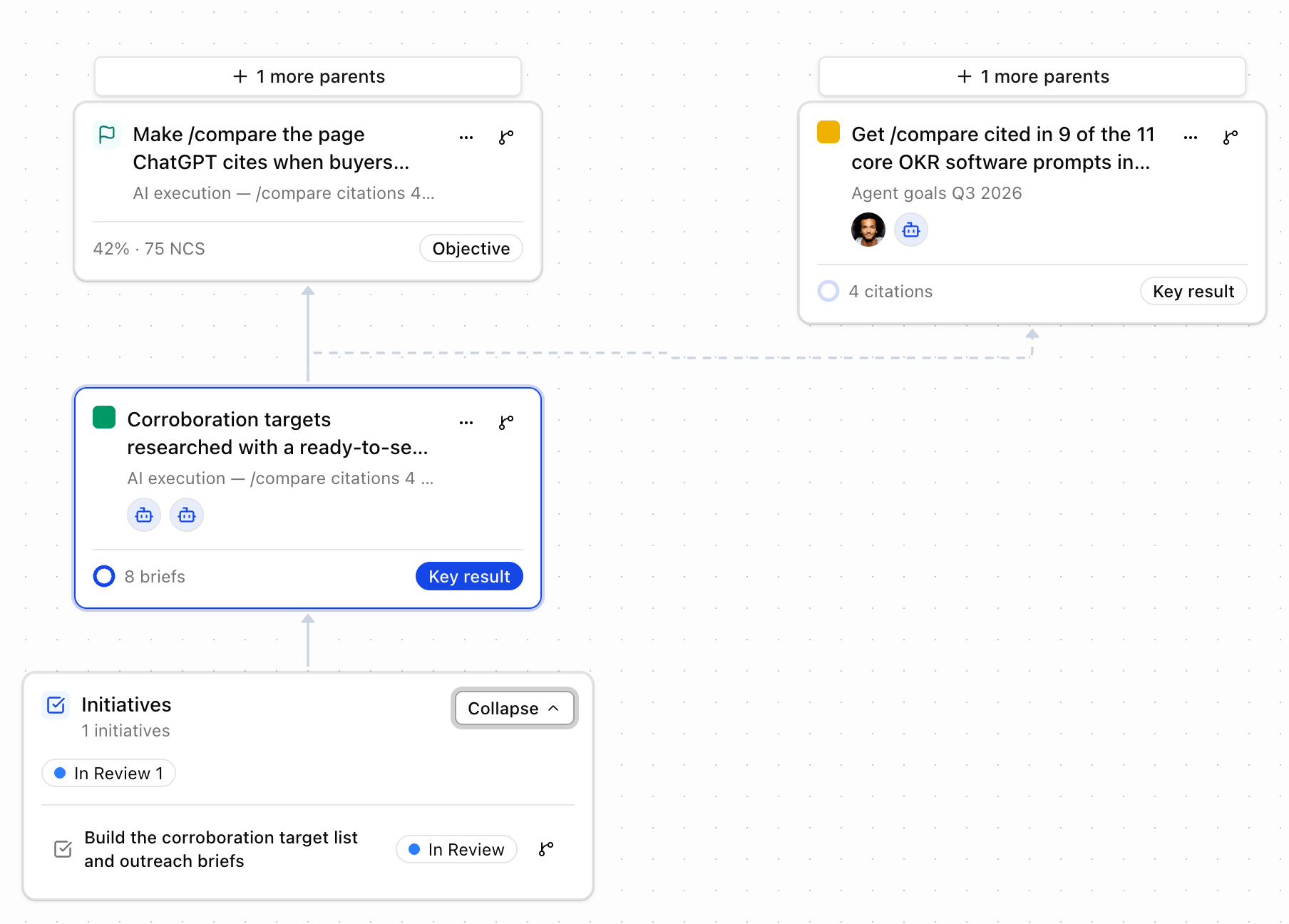
We want to scale our team by treating agents like remote teams.
Using a bring-your-own AI model (maximising capabilities)
This feels like being back to the pre-cloud era where everyone was running their own machines. But, in the case of AI, the easiest way to leverage the power of agents is (right now) to run them on a local machine that can connect to your tools, have access to the browser, and have deep integrations to your system. The cloud might catch up, but it’s currently hard to beat the flexibility and depth of a local setup.
So, if you have a laptop or mac mini with Claude or Codex, you can set this up in minutes.
How it works:
- Tability acts as the business context and orchestration layer
- The human team sets goals and monitors progress in Tability via the UI
- The agent team works on goals and updates progress via MCP
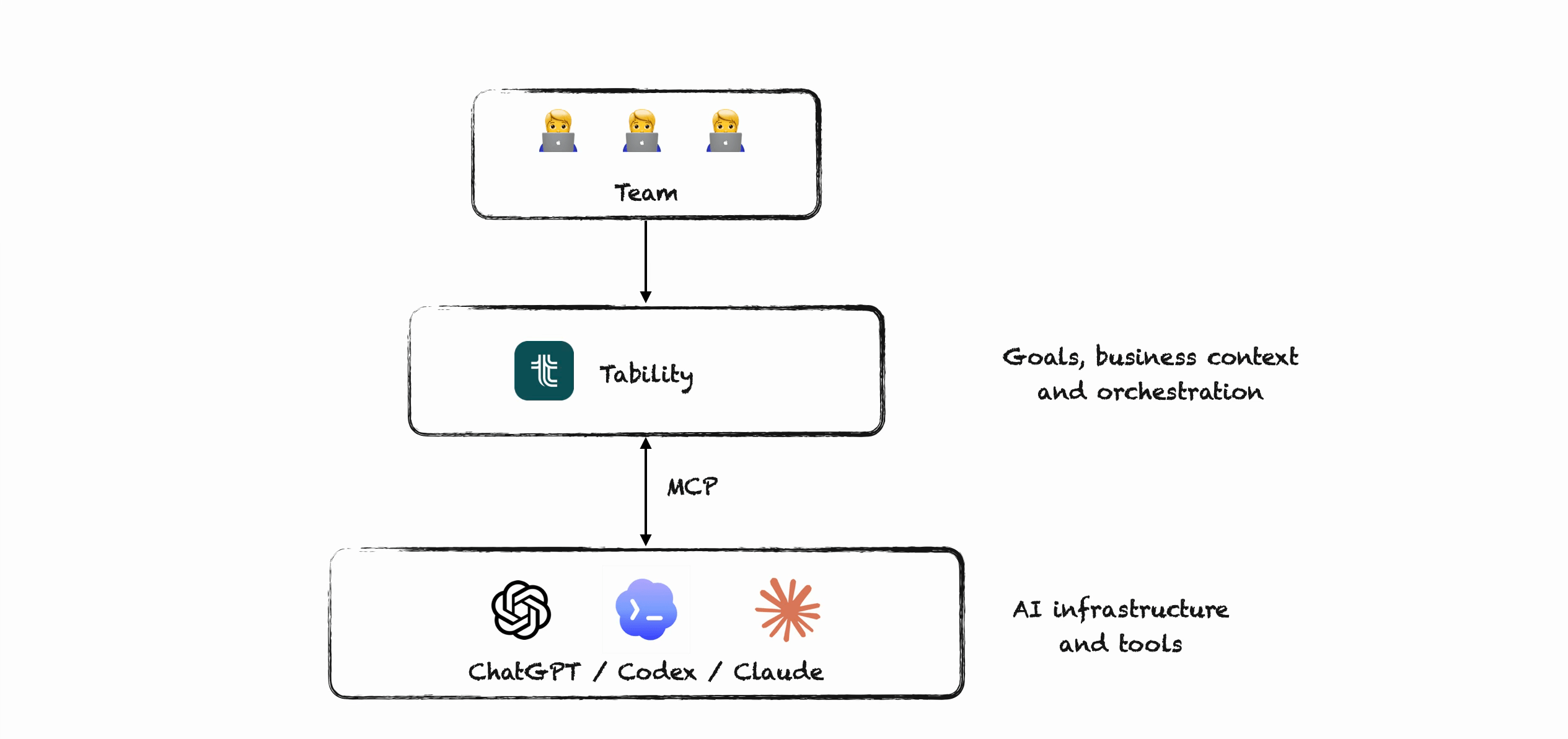
This approach is also how you can allow multiple people to interact with the same agents. Instead of trying to share prompts or access to your laptop, you can manage goals, tasks, and effort in a UI that is built for collaboration.
Goal assignment workflow
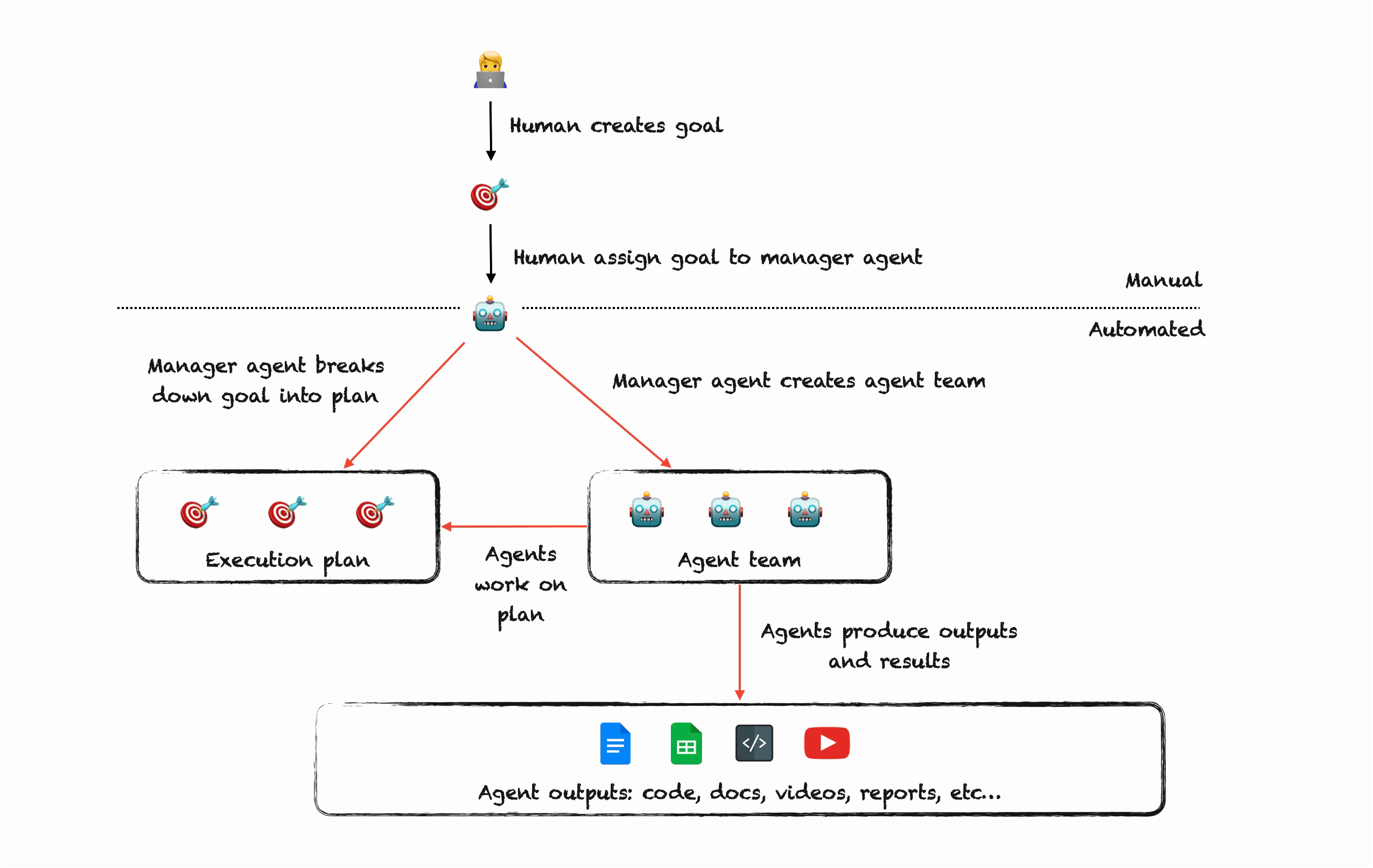
Here’s what the process looks like:
- You create a goal in Tability
- You assign to a manager agent
- The manager agent reads your goal and creates an execution plan for it
- The manager agent figures out the best team needed for it, and submits back to you
- After approval the team gets created and manager dispatches goals and tasks
- The agent teams works on the plan until everything is done
- Manager agent keeps updating you of progress, and can request your intervention if there’s a blocker
1-click + prompt setup
In order to set up a manager agent you need to create a heartbeat for it in your LLM client.
This is where we’ve iterated the most. We’ve tried bash scripts, a CLI tool, and step-by-step instructions. At the end we took inspiration from Cloudflare that provides an install prompt that you can copy into your client. This is by far the simplest approach today.
Instead of having to create the heartbeat manually in Codex or Claude, you can copy a prompt from Tability and paste it into your client. Then you can sit back and watch the setup being completed.
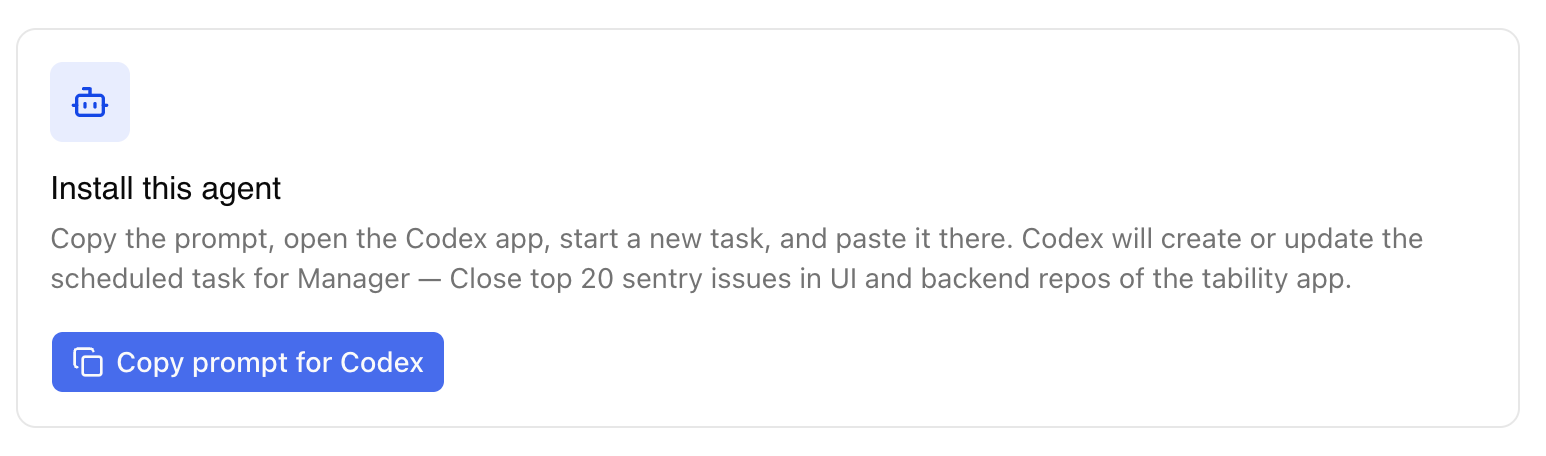
This is something that you only have to do once per team. Once the manager agent is set up, it can create heartbeats for all the agents it manages. Again, the idea is to minimise the need for human intervention.
Scaling questions
Right now we’ve got the hard limit on the number of agents a manager agent can hire. We’re still in a learning phase and we’ve limited the size of a team to 6 (1 manager + 5 managed agents). Theoretically there’s no limit to how big a team could be, but I’m anticipating that a huge team working on a single goal would lead to coordination problems at the end.
So far this has been working pretty well and here’s below the team that got created for the citation goal.
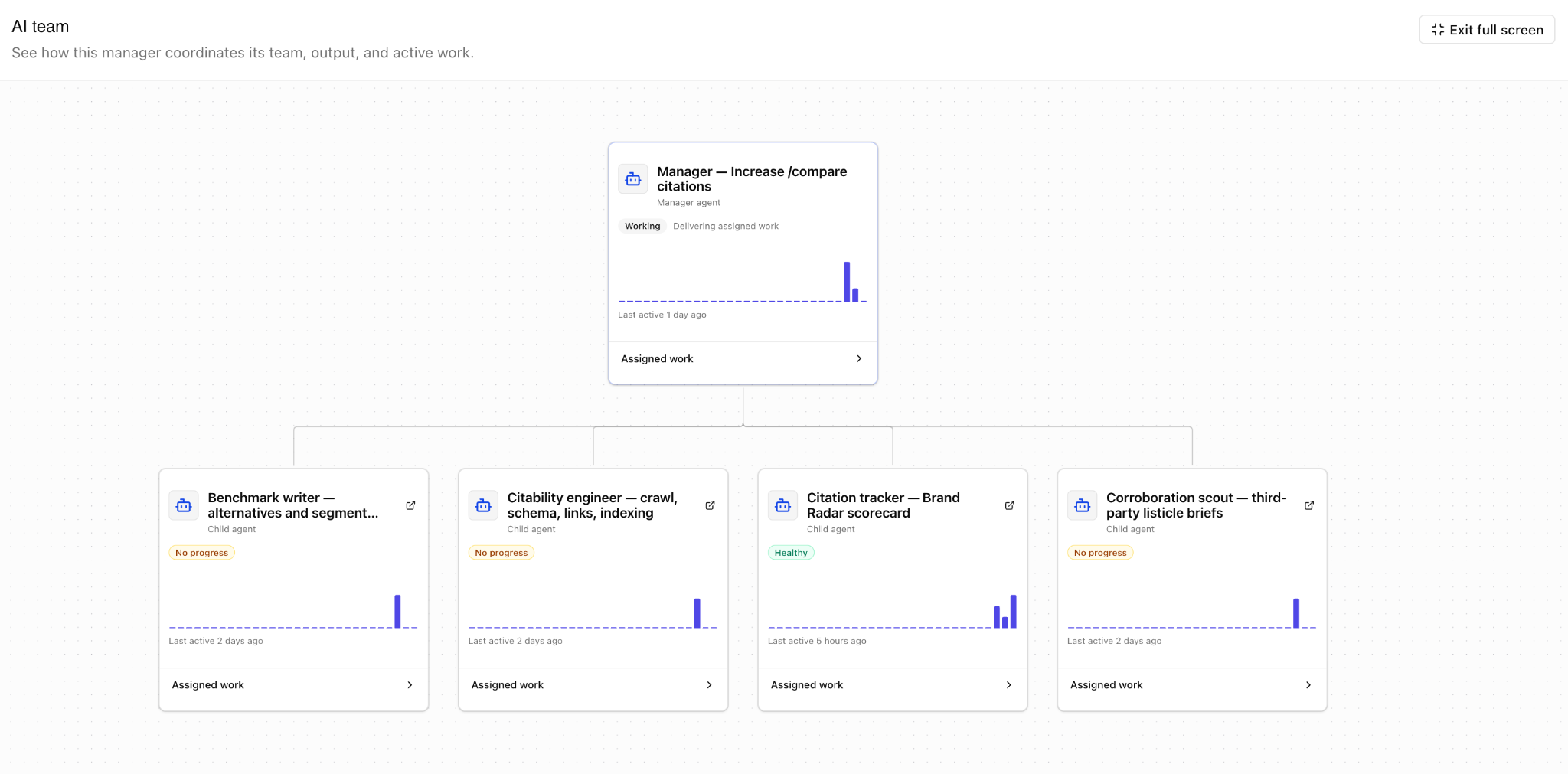
You can see the manager at the top, and the 4 different roles that it recruited.
In terms of scaling the UX. Each top-level goal gets an execution plan where all the work gets done. This is not so much done for the agents, but more for the humans that have to control the work. So below, you can see the Agent goals plan (where I set the top-level goals) and the AI driven sub-plans below for the different goals.
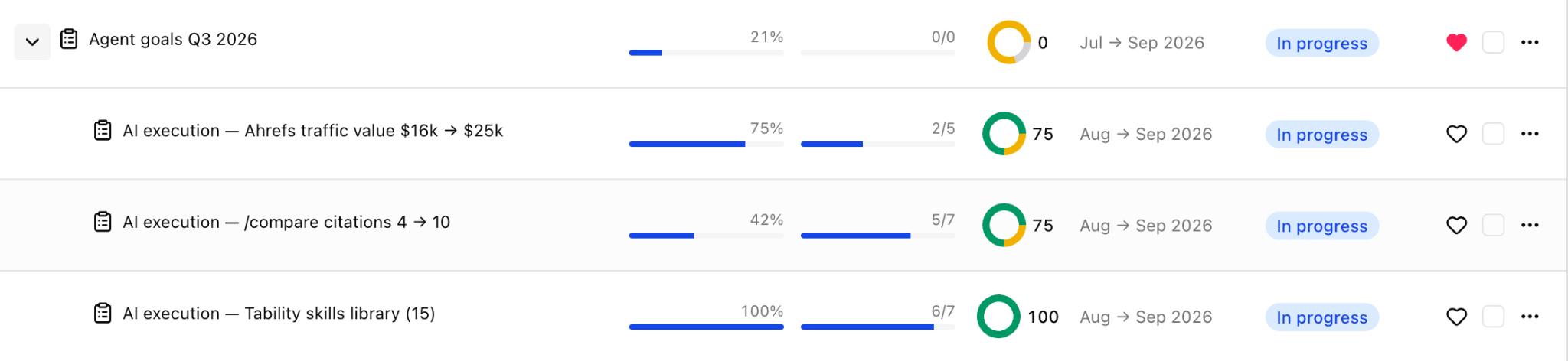
This might help again understand why Claude or Codex is not suitable for this as they don’t have a simple way to organise and monitor a bunch of related work (but it's reeeaaaally good at getting individual work done).
Claude vs. Codex? Which system is the best?
Note that ChatGPT isn’t listed here because I haven’t used it extensively yet. I’ve got a mix of Claude with Fable and Codex with 5.6 Sol.
So far my winner is Codex with 5.6 Sol:
- This system uses scheduled jobs/routines for the heartbeat, and Codex is a lot better at running uninterrupted.
- By contrast, Claude seems to (1) not be able to run scheduled jobs on auto mode, and (2) seems to forget actions that I previously authorised. I’ve had to spend some time in settings.json to update the whitelisted actions but once it’s done that’s ok.
- It feels like Fable is smarter in its suggestions, so I’ve used it for the more complex goals, but you can quickly run out of tokens
- 5.6 Sol seems a better ROI overall and I’ve been really happy with the outputs
How to get started
What you need:
- A Codex, Claude, or ChatGPT account.
- A Tability workspace (you can do a 14-day trial).
- Request access in this form.
If you have any questions (or feedback) email me at [email protected].


.jpg)


.png)