It wasn’t long ago that we were preaching the benefits of having your humans write your progress reports. Humans are just better at understanding context across multiple mediums and locations. An AI just isn’t going to know the context of a conversation you had in passing, a thought you never put down on paper, or why one doc is related to another in a totally different app or place.
For better or for worse, that's not the case really anymore. AI is probably better than us at this now.
If you’re someone who really takes the time to write great updates and analyse your work, then sure, that’s still better than having AI run the show. Getting real team engagement is always better.
But more often than not, you get check-ins/updates like:
“On track 👍”
Or:
“Made good progress this week.”
Or:
“We are on target to hit our revenue goal”
These types of updates tell us nothing. While it’s great the team is taking the time to do their status update, this information doesn’t help anybody when things do go bad and we’re going back in time looking for what may have caused it. We need context and analysis: What's happening that caused this? What did we do this week to push this forward?
Here’s a check-in from my Content Writer Agent (I call him Pablo) this week:
Status: 11 / 20 done. No change in done count. Two articles moved to in_review today: a state catch-up on BCG matrix and a fresh draft on value chain analysis.
Reconciliation
The 1 May Pablo run produced bcg-matrix.docx (1,750 words, drafted) and seeded the Tier 3 entry into master-list.json, but never moved the initiative or logged it to published.json. Caught that up today: BCG matrix initiative is now in_review with the agent comment, and published.json has the entry.
What I shipped this run
Keyword: value chain analysis. US vol 3,400, global 23,000, KD 15 (lowest difficulty in the planned queue), TP 1,300, CPC $35. Best risk-adjusted pick available.
SERP read: HBS Online (#2, DR 90), Quantive (#4, DR 70, ~580 traffic), Investopedia, IBM, HubSpot, IBISWorld. Page 1 is mostly textbook definitions.
Draft: value-chain-analysis.docx (~2,034 words). Reframes VCA as a portfolio prioritisation tool for operating teams, not a marketing-class diagram. Five-step process targeted at producing 3-5 structural moves. Worked SaaS example with cost / contribution / differentiation table.
Internal links applied (4): OKRs (Tier 2 push), BCG matrix (Tier 3 sibling), strategic roadmap (Tier 3 sibling), what is strategic planning (Tier 3 sibling).
State updated: appended to published.json and master-list.json (Tier 3 seed, date 2026-05-04). _meta.last_updated bumped on both.
Pipeline state
Done: 11 (no change. Done only moves when Bryan publishes from in_review).
In review (Bryan publish queue): 12 — now includes BCG matrix and value chain analysis on top of operational excellence, performance management system, continuous performance management, agents vs humans status reports, stop micro-managing your agents, what is performance management, RACI matrix, strategic roadmap, what is strategic planning, plus one earlier piece.
Planned: 16 (down from 17 today; BCG was already drafted but only logged as in_review today). Top remaining picks: business model canvas, McKinsey 7S framework, GROW model, OKR framework, strategic thinking.
Confidence: yellow.
Same call. The drafting cadence is healthy and the angles keep getting tighter, but the in-review queue keeps growing because nothing has been published in the last fortnight. KR1 (keywords in top 20) cannot move until articles ship to Webflow. Highest-leverage human action right now is Bryan triaging 3-4 of the 12 in_review pieces and pushing them live. Even a small batch starts generating ranking data within 6-8 weeks.
Next up for Pablo
1st pick: strategic thinking. Vol 3,900, KD 21, TP 1,900, CPC $60 (high commercial intent). Same-tier difficulty as VCA, slightly higher volume.
2nd pick: McKinsey 7S framework. Vol 800 US / 6,500 global, KD 33, TP 1,500. Solid cluster broaden after VCA / BCG / strategic roadmap.
3rd pick: business model canvas. Vol 17,000, KD 46, TP 12,000. Biggest TP in the queue but real difficulty. Worth swinging for if the in-review queue is moving.
It’s descriptive, it’s analytical, and properly gives context to the progress made. Every week I get a check-in written for me that catches me up on everything that happened, why it happened, and some next steps.
The best part? It was completely automated. No prompt, no manual push... just a notification that it was complete.
It’s not your team’s fault: Why your team doesn’t do their check-ins
I want to not blame the team too much for this. It really isn’t their fault.
Reason 1: It’s busywork
You hired a graphic designer to graphic design, not write updates. You hired a content writer to write content, not write status reports.
This is the bureaucracy and busy-work that we put our teams through to maintain transparency for both management and leadership… and people can feel that. They know when something is adding value to their work, and when it’s just something they have to do to keep the system happy. Status updates often fall into that second category.
So what happens? They optimise for speed, not quality. They do the bare minimum to “complete the task.” They write something that technically counts as an update… but doesn’t actually communicate anything useful.
From their perspective, the real work is somewhere else. The real work is designing, coding, writing, selling. The update is just a tax on that work.
Reason 2: Lack of reciprocation
One of the more common reasons teams don’t put effort into check-ins is simple: nothing happens with them.
They write an update… and it disappears.
No feedback. No questions. No decisions made from it.
So over time, they learn that the quality of the update doesn’t matter. Whether they write a detailed breakdown or just say “on track 👍”, the outcome is the same. Humans are very good at picking up on these feedback loops. If effort isn’t rewarded, it disappears.
Reason 3: Context switching is expensive
Writing a good update requires stepping out of the work, reconstructing what happened, analysing it, and then communicating it clearly.
That’s a completely different mode of thinking.
If someone is deep in a design flow, or writing code, or researching, asking them to suddenly switch into “reporting mode” is costly. It breaks momentum. It interrupts flow.
So again, they optimise: They write something quick so they can get back to work.
Reason 4: They don’t have the full picture anyway
Ironically, we ask individuals to write updates about systems they don’t fully see.
- A developer might not know how their work ties into marketing.
- A marketer might not know what’s happening in product.
- A content writer might not know the full distribution plan.
So even if they wanted to write a great update, they’re missing pieces of the puzzle.
This is where agents actually have an advantage. They can pull from multiple sources, stitch together context, and produce something more holistic than any single person reasonably could. Tability's AI can build great reports in seconds.
Why not give this job to Agents? Let your teams focus on the work
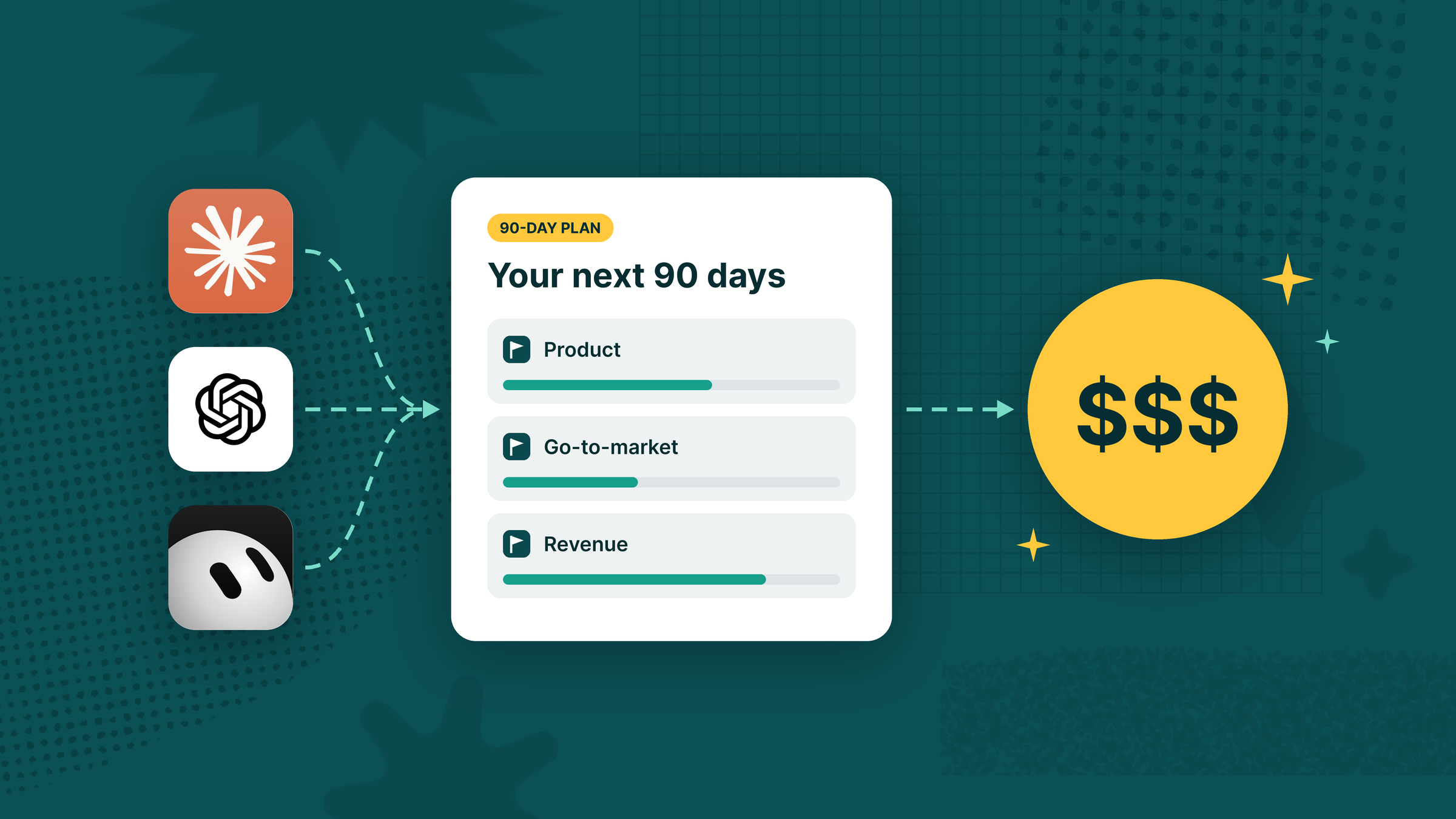
Using Tability’s Agent Manager, you can easily set up an automated check-in loop that will help your team members create check-ins without ever interrupting their workflow.
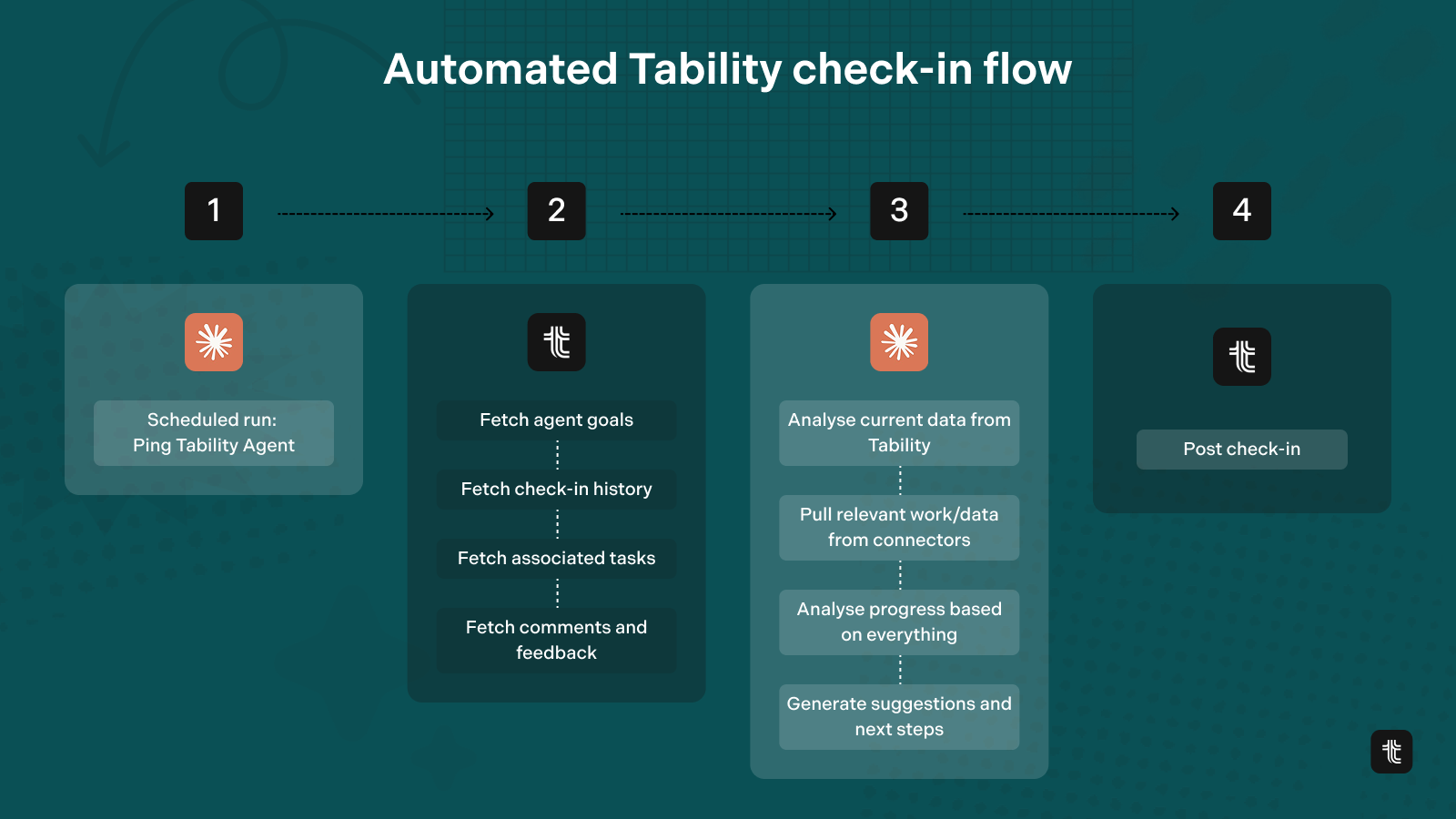
Here’s what you need to set it up:
- Claude, OpenAI, or your choice LLM connected to your tools
- Connect your LLM to Tability using Tability MCP connector
- Set up an Agent using Agent Manager in Tability
- Create some goals or attach your Tability Agent Manager to existing ones
- Set up a scheduled prompt in Tability to send a weekly report based on your sepcifications
Every week your LLM will ping it’s connected Tability Agent, and run a check on all the goals assigned to it. Using the connectors in place (in your LLM), it’ll pull relevant data, analyse progress, and create a check-in.
Importance of good check-ins for your monthly/quarterly/annual reports
If AI is good for anything, it’s for analysing and summarising things. At the end of the month or the quarter, you’ll usually want a report. What is a report if not an analysis and summary of what you’ve already done?
Humans aren’t that great at keeping track of the full story over a long period of time. Tracking down the data, finding the work that was done, reading the check-ins and conversations that happened.
This is why today you look like this:
The work is everywhere. It’s in different tools, different places in time and space, some things lost in the ether and water cooler discussions. That’s why check-ins are so important to be consistent with.
Those check-ins you’ve been doing for weeks keep context over time. They aren’t just for your weekly meeting, you’re going to put them to great use later!
They are the molecules that will make up the bigger picture story in your monthly, quarterly, and annual reports.
Using Tability’s Agent Manger and Scheduled Prompts in Tability, this part also becomes infinitely easier. You can basically create a full reporting loop without a human ever writing a check-in.
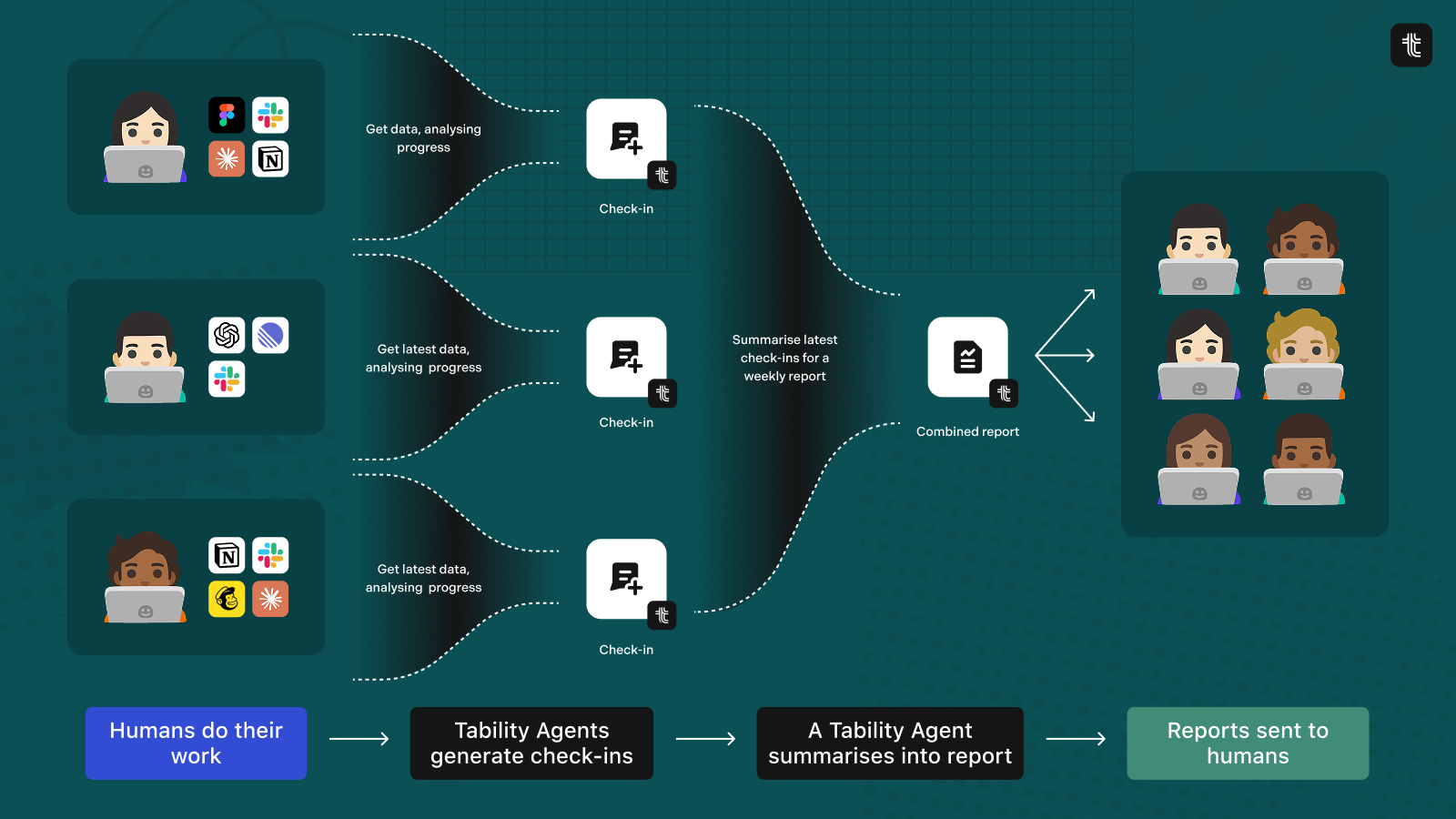
Looks something like this:
- Your team does the work
- They write a daily stand up or a weekly check-in to report details on what they worked on, analyse progress, latest KPI data
- You take all those check-ins and collect into a single report to redistribute to the entire team or stakeholders
- Later those reports are used for retrospectives, quarterly/annual reports.
Your team does the work and the reports build (and distribute) themselves!
👋 Set up a scheduled prompt in Tability to get automated reports whenever you want, however you want it.
Welcome to the future of OKRs
A lot of Agent and AI talk on X and Linkedin these days sound like complete vaporware, but this is actually functional. If you want to try out this workflow today, sign up to get early access today.

.jpg)

.png)