
Most executive status reports are written for the person writing them. They list everything the team did, in the order it happened, across twelve slides. The leader reading it has four minutes between meetings and one question: is there anything I need to do?
An executive status report answers that question on one page. It tells leadership where the strategy stands, what's off track, and what decisions they need to make — and it leaves everything else in the team reports where it belongs.
Below is a one-page template you can copy, a filled-in example, and how to roll several team reports into one without losing the signal.
What an executive status report is (and isn't)
An executive status report is a short, regular update for leadership, a board or an executive sponsor. It summarises the state of a strategy, programme or portfolio of projects and highlights what needs their attention.
It's different from a project status report. A project report helps the team coordinate the work, so detail is useful. An executive report helps leaders make decisions, so detail gets in the way. If a line doesn't change what a leader would do, it doesn't belong.
The pattern is consistent: the best executive reports are mostly empty space around a few exceptions.
The one-page executive status report template
Copy this into your doc, email or slide. Keep the order — it's the order a leader reads in.
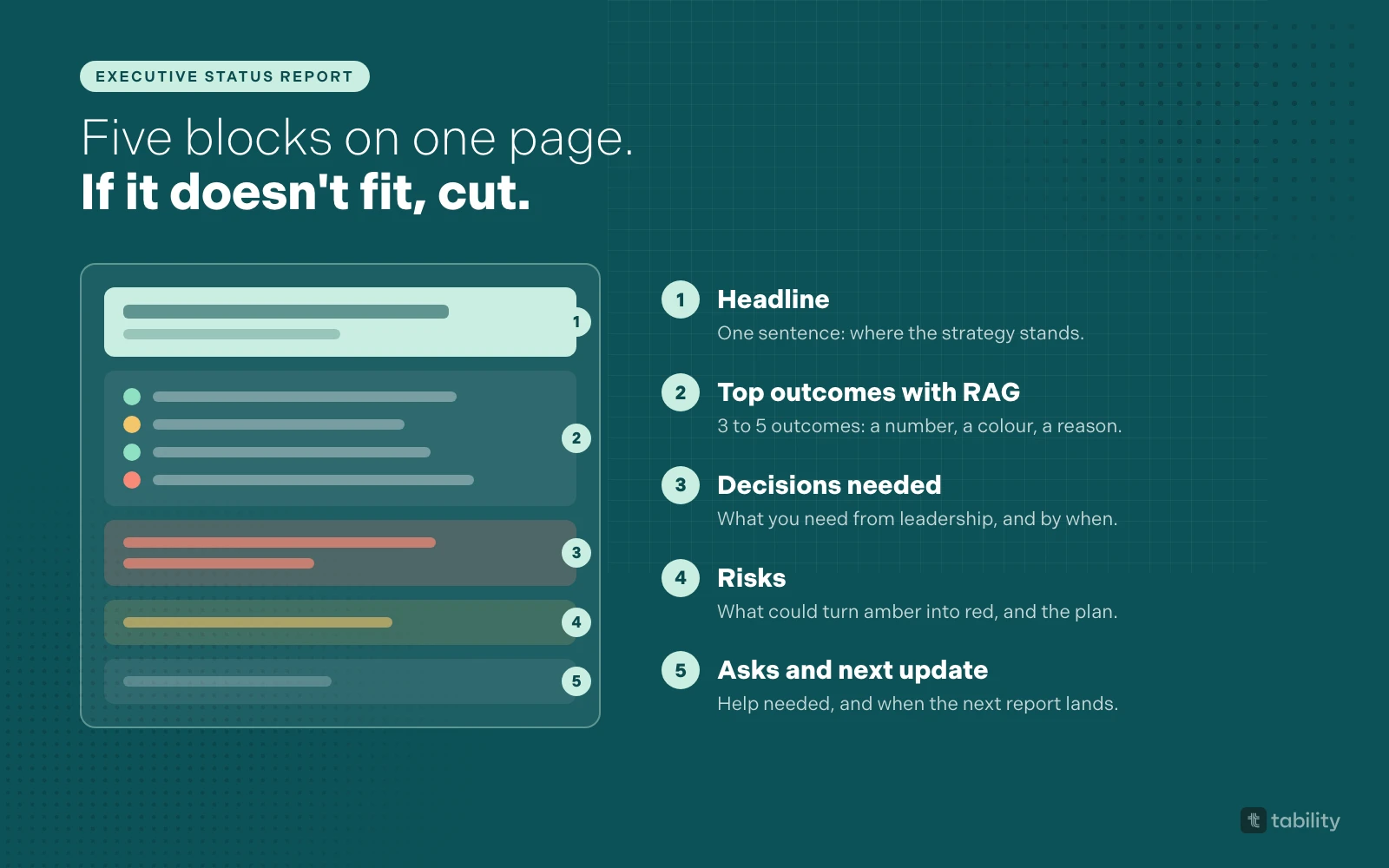
A few notes on each block:
Headline. One sentence a leader could repeat in the next meeting. "Q4 is on track except enterprise pipeline, which needs a pricing decision this week" beats "Good progress across most areas."
Top outcomes. Three to five, no more. Each gets a current number, a target, a RAG status and one line of reason. If you have twenty outcomes, pick the ones leadership actually committed to, and put the rest in an appendix nobody has to read.
Decisions needed. The most valuable block on the page, which is why it sits right under the numbers. Give the options and your recommendation, so leadership can say yes or no instead of starting a discussion.
Risks. Only the ones that could change a colour. "Hiring is slow" isn't a risk unless it threatens an outcome above.
Asks. If you need nothing, say "None this period". That's useful information too.
A filled-in example
Here's what it looks like for a fictional software company at the end of October. The numbers are illustrative.
It takes two minutes to read. The CEO knows the state of the quarter, has one decision to make, and can see where help is needed.
How to roll up team reports without losing the signal
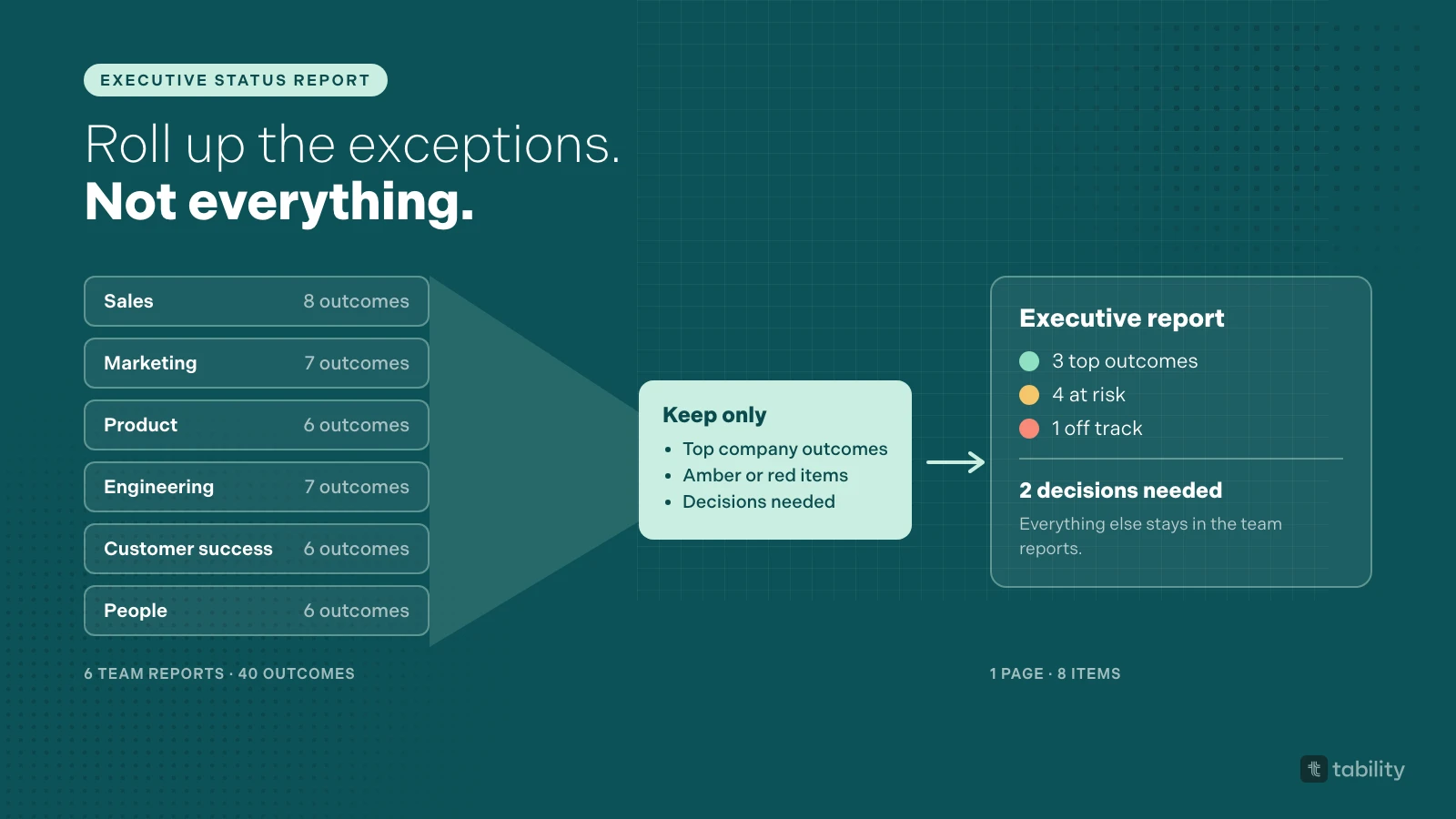
The hardest part of an executive report isn't writing it. It's deciding what to leave out when six teams send you forty outcomes.
The answer is to treat the executive report as a filter, not a summary. Keep three things and drop the rest:
- The company-level outcomes leadership committed to, whatever their colour.
- Anything amber or red from the teams, with the reason and the plan.
- Every decision that needs someone above the team.
Everything that's green and team-level stays in the team reports. If a leader wants to dig in, they can — but they shouldn't have to wade through it to find what matters.
This only works if the team-level colours are honest and current. If teams update once a month, your executive report is a month old the day you send it. A weekly check-in habit at the team level is what makes a reliable executive report possible.
Weekly or monthly?
Match the cadence to the decisions, not the calendar.
Weekly works for a leadership team running a fast-moving company, a launch, or a turnaround. Keep it shorter — headline, reds and decisions — and send it at the same time every week. Our weekly status report template has a version for this.
Monthly works for a board, an executive sponsor or a steering committee. It's the full one-pager above, and it often feeds straight into a monthly business review or a quarterly business review.
Many companies run both: a weekly note for the leadership team and a monthly report for the board, built from the same data.
Mistakes that make executive reports get ignored
Leading with activity. "We ran 14 experiments and shipped 3 features" tells a leader what you did, not whether it worked. Lead with outcomes.
Hiding the bad news on slide 9. If something is red, it goes at the top. Leaders who find a red item buried late stop trusting the green ones.
Colours without reasons. An amber with no explanation sends the reader chasing you, which defeats the point of the report.
Rewriting it from scratch every time. If producing the report takes a day, it'll be late and you'll resent it. Keep the template fixed and pull the numbers from where they already live.
Stop assembling the report by hand
If your executive report starts with chasing teams for updates and copying numbers into a doc, the data is in the wrong place.
In Tability, teams check in on their goals every week with a number, a confidence level and a note. Leadership dashboards and reports are generated from those check-ins, and you can schedule a brief that writes itself every week. If you run the leadership rhythm for your company, our guide to the chief of staff weekly leadership brief shows how to set it up.
Frequently asked questions
What should an executive status report include?
A one-sentence headline, three to five top outcomes with a current number, target and RAG status, the decisions you need from leadership, the risks that could change a status, and any asks. Everything else belongs in the team or project reports.
How long should an executive status report be?
One page, or one slide. If it doesn't fit, you're including detail that doesn't change any decision. Move it to an appendix or link to the team reports.
How is an executive status report different from a project status report?
A project status report helps the team coordinate the work, so it covers tasks, milestones and blockers in detail. An executive status report helps leaders make decisions, so it only covers outcomes, exceptions and the decisions needed.
How often should you send an executive status report?
Weekly for a leadership team running fast-moving work, monthly for a board or executive sponsor. Pick the cadence that matches how often leadership needs to make decisions on the work.
Try it this week
Take the template above and fill it in for your current quarter. Limit yourself to one page and put the decisions right under the numbers. Then send it at the same time next week.
If you'd rather have the numbers and colours ready before you start writing, try Tability and let your team check in on the goals that will feed it.