Ask anyone who runs a strategy process where their hours go, and "setting direction" rarely tops the list. Most of the time goes to chasing updates, copying numbers into slides, rebuilding the same scorecard every week and writing a monthly review that half the room skims.
That work still matters. Leadership needs a clear view of progress, and teams need to know where to focus. But nobody joined a company to format a status deck.
This is exactly the kind of work AI handles well: pulling structured data together, spotting patterns across dozens of goals and drafting something a person can review in a few minutes.
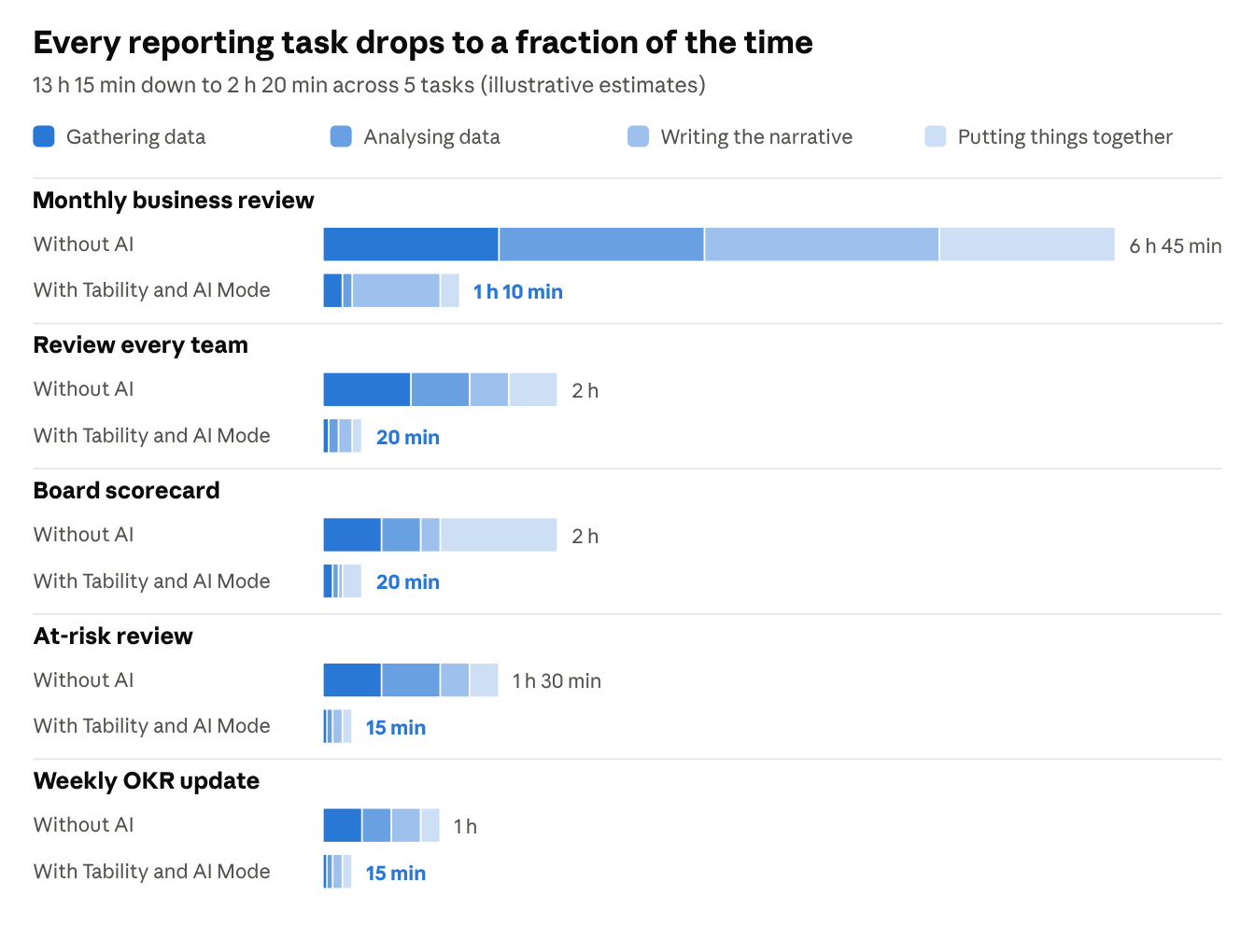
Below are five reporting chores we now hand to AI Mode in Tability, each with a 30-second clip showing the prompt and the result.
Find what's slipping before the meeting
Spotting at-risk work usually means opening every plan, scanning check-ins and guessing which red dot matters most. It takes long enough that it happens the morning of the meeting, if it happens at all.
The prompt: "What's at risk this week? Show me the key results that need intervention, why, and what I should do about each."
AI Mode reads every key result, check-in and initiative, then ranks the gaps against target. In the clip it flags five key results – contribution margin at -4% against a 0% target, invited seats at 10,850 out of 12,500 – and attaches a next step to each, such as deciding on a proposed $5 free-shipping minimum.
The ranking is what makes it useful. Thirteen amber items on a dashboard tell you very little. Five ranked gaps with a suggested action give you an agenda.
Check every team in one pass
The leadership meeting starts in an hour and five teams need checking. The usual routine is to click through each plan in turn and take notes.
The prompt: "Review my teams – show me how each team's OKRs are tracking and where each one needs my attention this week."
AI Mode returns one row per plan with its green, yellow and red count, plus the single key result that needs you, its owner and the reason. Product's invited seats in strategic accounts sit at 10,850 against 12,500, with CS rollout coverage as the blocker. Sales has proof-of-value conversion at 67% against 74%, and two open deals need a procurement risk review.
You walk into the meeting knowing which conversation to have with whom. The first 20 minutes stop being a status round.
Stop writing the Monday update
The two prompts above are one-offs. The weekly OKR update is the same job every week, and it easily eats an hour.
The prompt: "Every Monday at 8am, email me a summary of our OKR progress – what moved, what's at risk, and what needs my attention."
AI Mode drafts both the report brief and the schedule, then shows you the title, cadence, timezone and recipient and waits for a confirm before creating anything. Once saved, it sits in your scheduled prompts and runs every Monday at 8am.
The summary is in your inbox before you open your laptop. Your Monday hour goes back to acting on what it says.
Draft the monthly business review from your check-ins
It's month-end and the business review is due tomorrow. Most of the effort goes into rereading a month of updates and working out what the story is.
The prompt: "Build my October monthly business review – performance against our OKRs, what drove the results, and the decisions we need to make."
AI Mode reads the plan and every October check-in, then produces a one-page review with a headline that takes a position: "Store growth is mixed: efficiency is improving, but margin needs a decision." Below it sits the status split (3 on track, 2 at risk, 1 off track, 46% average progress) and three columns for what worked, what stalled and the decision needed.
Two details matter here. The review ends on a decision – whether to test a $5 free-shipping minimum – so the meeting has something to resolve. And it lists its sources, so anyone can trace a claim back to the check-in it came from.
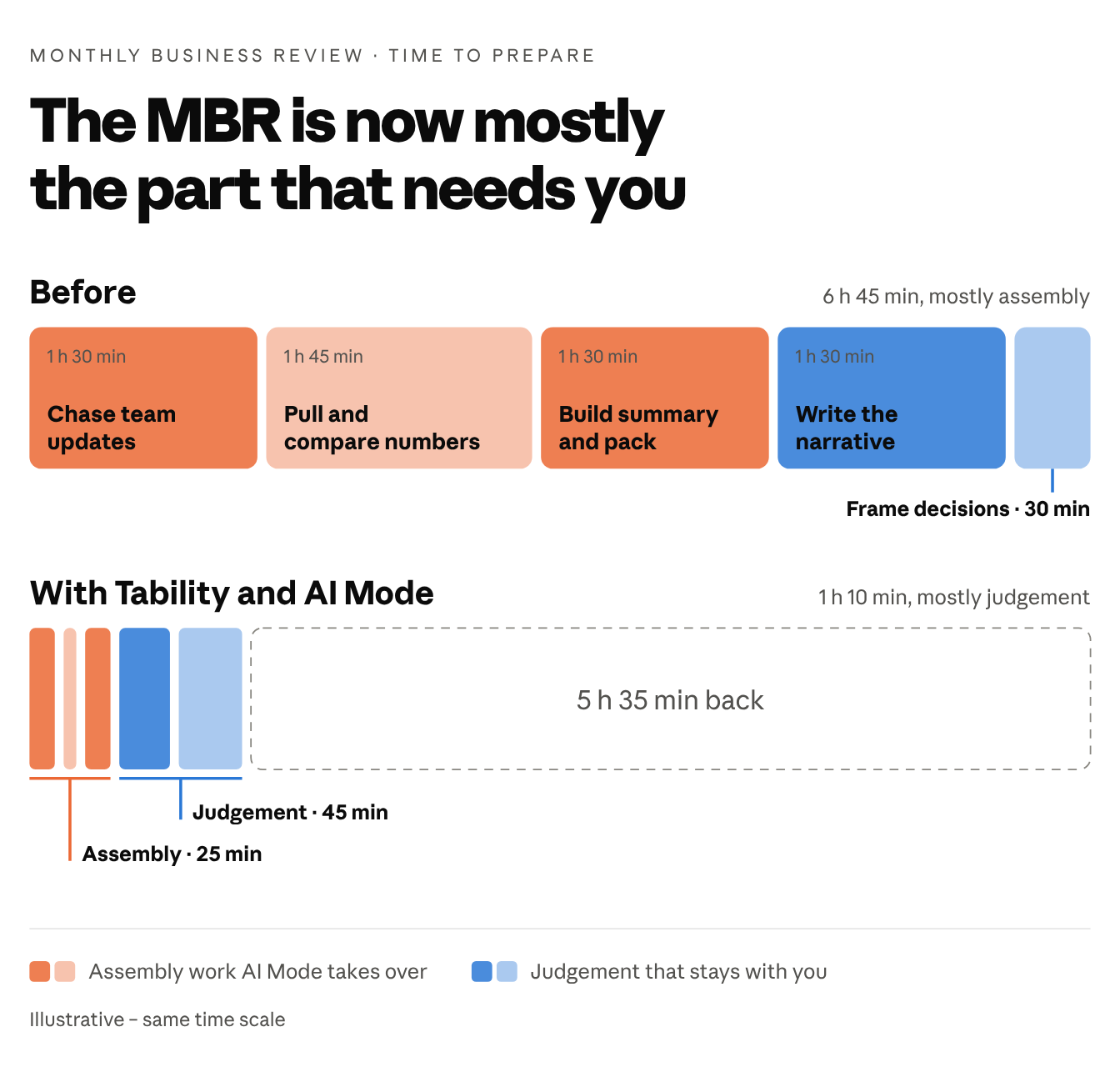
The time that remains is the part worth a person's attention: checking the narrative holds up and making the call.
Set up a board scorecard without the spreadsheet
Some boring work is setup rather than reporting. The board wants a SaaS scorecard by Friday, which normally means a spreadsheet, five rows of formulas and a debate about where it should live.
The prompt: "Create a SaaS scorecard – ARR $5M, net revenue retention 120%, logo churn under 5%, CAC payback under 12 months, and trial-to-paid conversion 20%."
AI Mode previews the five KPIs, their targets and the view that will group them, and holds off until you approve. Once approved, each KPI gets a monthly target. You add actuals as the months close, and the view shows which numbers have reached target.
Keep the judgement, hand over the assembly
Every example above runs on data your team already entered: check-ins, KPI actuals, initiative updates. AI can't rescue a stale plan. If nobody has checked in for three weeks, the at-risk report will be confidently wrong.
So the weekly check-in habit matters even more once AI is reading it. Keep the updates short and honest, and the reports that come out of them will be worth acting on.
The decisions also stay with you. AI Mode can tell you that contribution margin is the biggest gap and suggest testing a free-shipping minimum. Someone still has to decide whether that's the right call.
If you already use Tability, open AI Mode and paste one of the prompts above into your own workspace. If you don't, you can try it at tability.io.