> Be very online
> Get agents fomo
> Spin up an army of agents
> Cool now you’ve got AI employees
> But now you’ve got to manage AI employees
> ???
I’ve never seen anything moving as fast as the agent space. Not so long ago there was huge skepticism about the ability for agents to produce good code. Now people are using OpenClaw to run fully autonomous agents on Mac Minis. In the past 12 months, I’ve moved from Cursor to Claude Code to Codex. I now have both a Claude client and a ChatGPT client sitting side-by-side on my screen. The Cursor team just announced autonomous agents and I’ve ordered a mac to experiment safely with OpenClaw. I have yet to look into Perplexity Computer.
We’ve fully adopted AI at work (non-devs are even building and shipping complete marketing/support assets) but with all this commotion we’ve noticed a new problem emerging.
The problem: spinning up agents is easy, organising agents is hard
The great thing about agents is that they can work 100-1000x faster than humans on specific tasks. And they can do so 24/7.
So, in theory you could just let agents run and solve problems.
While this may be happening in some narrow use cases (trading, code reviews, bugfix, perf optimisation), it’s something that is hard to do at the scale of a business.
The issue isn’t to let the agents run wild – the hard part is giving agents problems to solve. I very much love the innovation happening in the orchestration space, but it seems that many projects are taking a zero-humans in the loop approach.
We may get there, but my mental model is more akin to a Tony Stark/J.A.R.V.I.S. approach where humans are very much in control of picking the problems and coordinating efforts, but they outsourced a ton of work to autonomous agents.
So how does that look like?
The guiding principles
Principle #1: Keep it simple
It’s very easy to make this kind of stuff complicated. But, the good news is that we can look at the old internet to see what can go wrong.
For this to work we need to avoid unnecessary features, complex setup, obscure UIs. This is a tool that needs to be rolled out and used for any team. e.g., Midjourney was amazing, but not as easy as attaching a picture to ChatGPT and saying “do the studio ghibli thing”.
Principle #2: Support any agent
Claude Code, Codex, Cowork, OpenClaw, a local LLM… You should be able to use any agent infrastructure, and swap things whenever you want.
Principle #3: Keep it real
While the dream would be for all of us to just write “grow our business from 0 to $10m ARR” and see agents get to work, the reality is that real people™ will have to break lofty goals into smaller ones and jump in to control and/or stir the work.
Principle #4: Save tokens
Not everything needs to be agentic. Of course, you can plug an agent to Salesforce to ask about the size of your pipeline but this is unnecessarily expensive for something that can be pulled directly via an API.
(This is literally what the agent will be doing anyway)
Principle #5: Humans will do the work too
This isn’t a zero-human model. We very much believe in building a tool that can be used by virtual agents and real people.
The new hybrid teams discussions will be about virtual vs. real instead of onsite vs. remote.
We need a great set of APIs for agents AND a great UI for humans.
The model
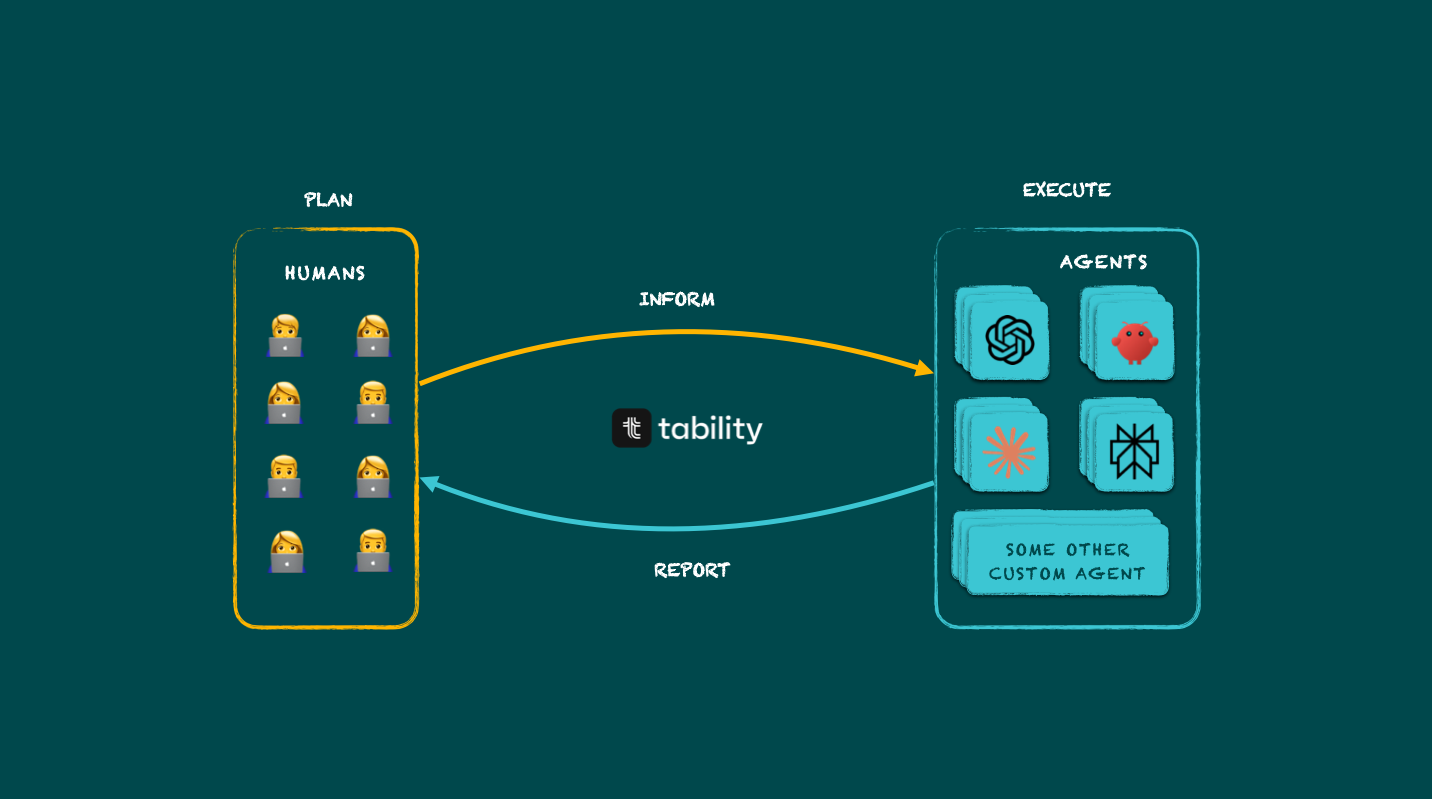
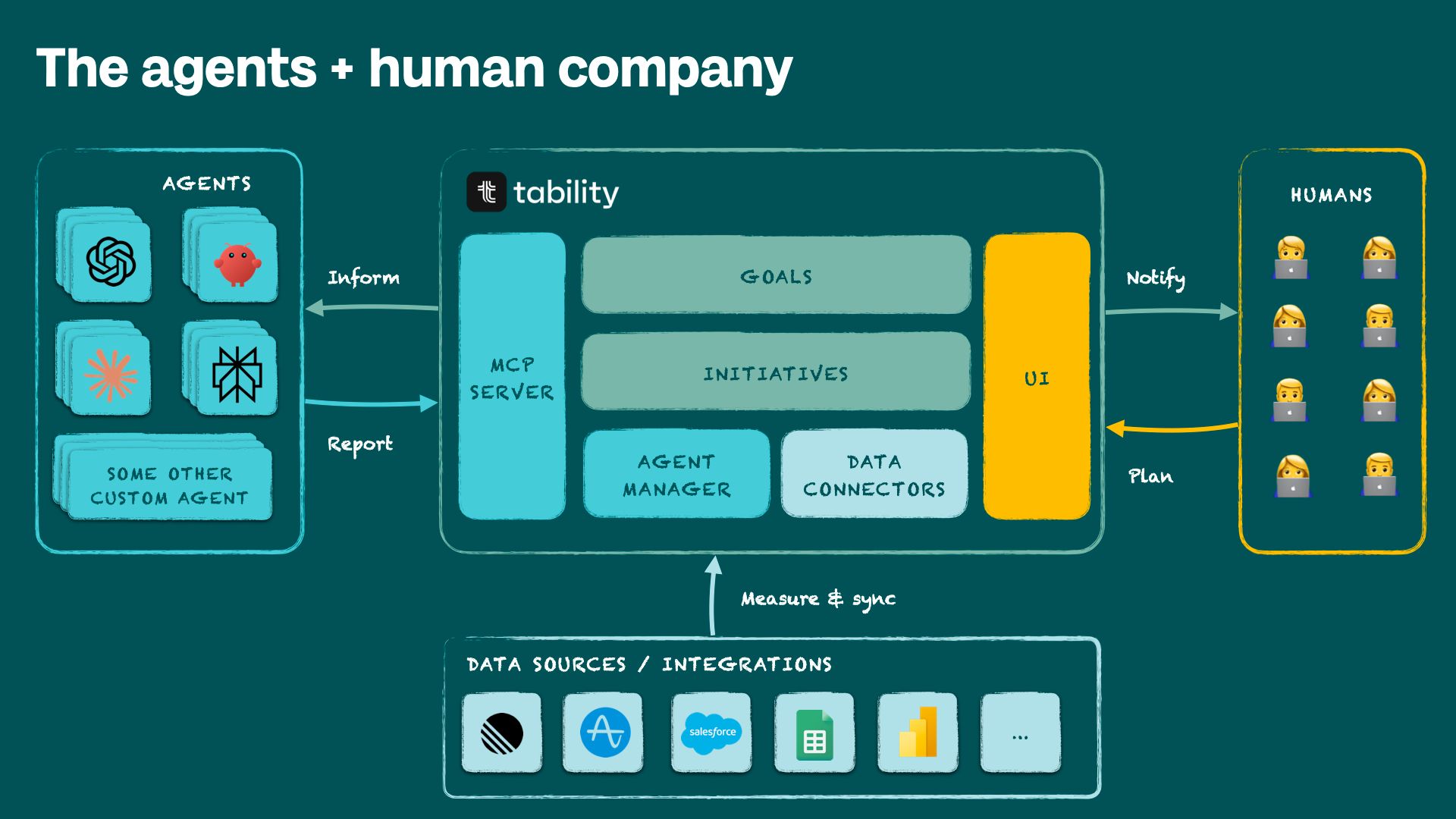
At a macro level, here’s how things are organised
- Your agent infrastructure can be anywhere
The teams at OpenAI, Claude, Google and open source projects like OpenClaw are doing an amazing job at building this layer – it’d be stupid for us to try to replicate that. What we need is to connect to it. - Tability is your business context
Tability is where goals get defined, broken down into a set of bets and experiments for humans and agents, and where progress is tracked and documented. - Data connectors simplify reporting
Tability will connect directly to data sources to track progress on a goal (e.g., tracking weekly progress on retention). This helps you save tokens that you can re-invest in doing the actual work to improve a metric. - Humans plan and steer via the UI
High-level goals are set by humans, and the UI makes it easy to delegate to agents or take back control if necessary.
Real example: building a team of agents to tackle a SEO goal
Here’s a full example of how we’ve created a small team of agents to manage https://www.tability.io/compare.
Context:
- It’s a new NextJS website we just launched
- A Codex agent can implement all changes
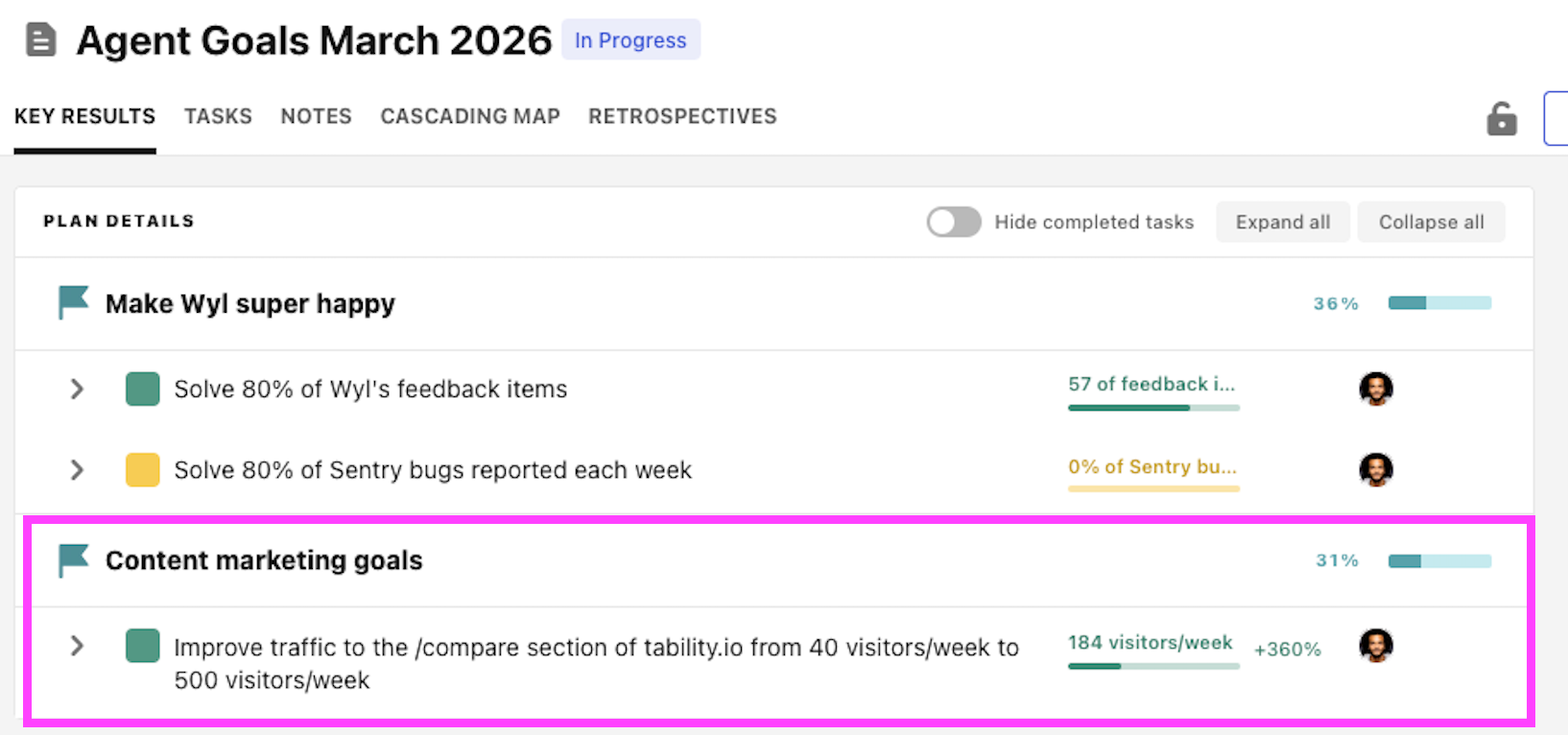
- We want to increase traffic from 20-40 visitors/week to 500 visitors/week by end of the month
Step 1: create the goal
The first thing you need to do is to create the business context for the team of agents. This can be done quickly in Tability by creating a plan with the agent goals.
Step 2: create the agent profiles in Tability
Now that I have my goal, I’m not going straight to Claude Code or Codex or ChatGPT to create skills to do the work. This can be quite painful and hard to scale with a team. Quite often you end up with a bunch of custom prompts and skills that are on your machine but that hardly contribute to making the rest of the team productive.
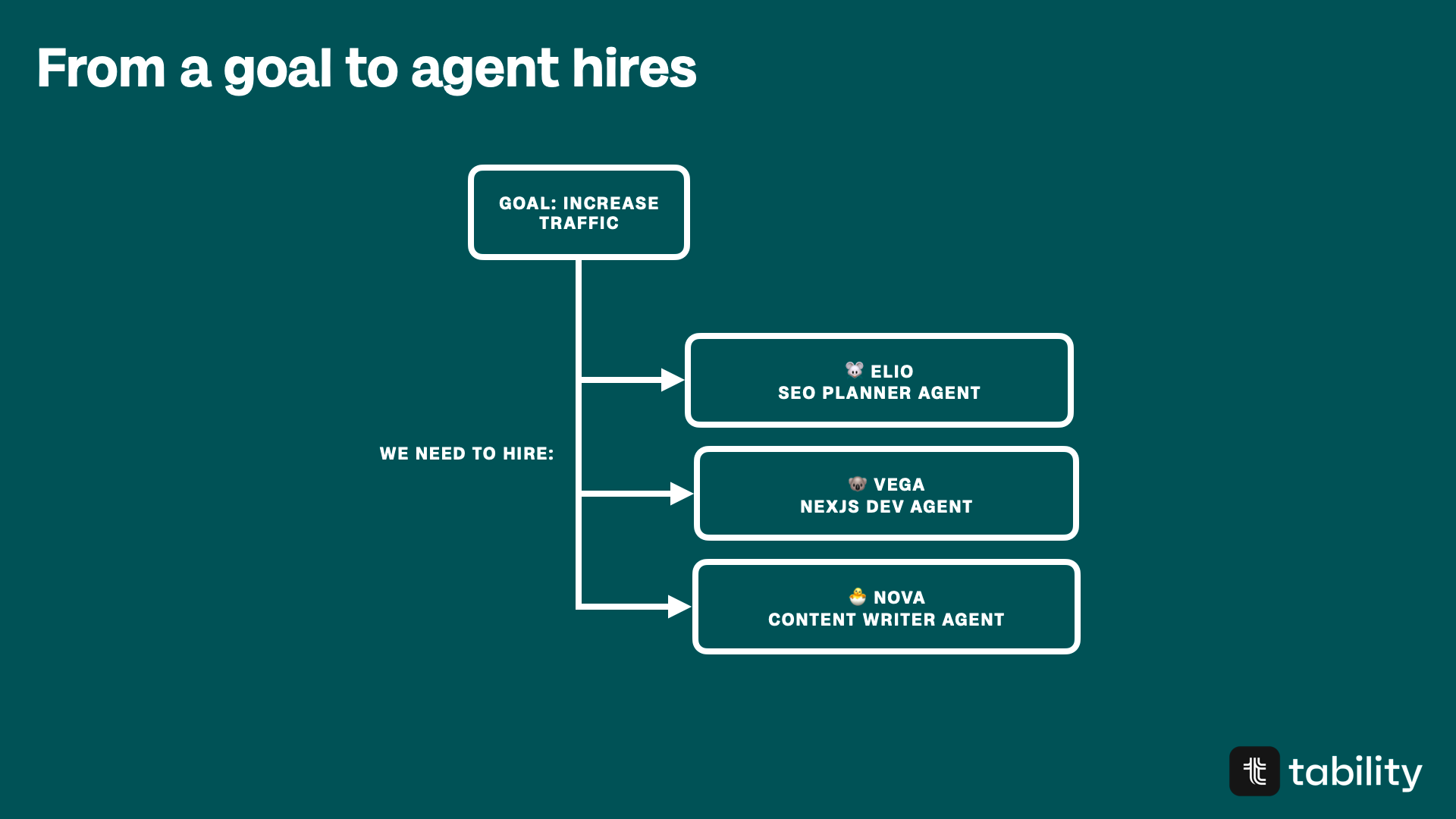
What I do instead is think about the goal we have and the types of agents we need to “hire”.
In this case we’re keeping it simple with 3 agents:
- 🐭 Elio: SEO Planner agent, in charge of analysing things and finding opportunities (it’s the agent that schedules work for others)
- 🐨 Vega: Dev agent that can implement changes on the NextJS website
- 🐣 Nova: Content agent that can produce content
In my experience it’s always best to keep your agents specialized rather than having one bulky agent that is supposed to do everything.
This also makes it super easy to match agent profiles to missions (you’ll see later what I mean).
So, now that we have a draft team, it’s time to create the profiles in Tability. Once again, we’re not yet touching Codex, Claude, or any other LLMs. We’re creating the “job descriptions” that your agent infrastructure will use to find work to do and execute things.
Here’s what Elio’s profile looks like in Tability
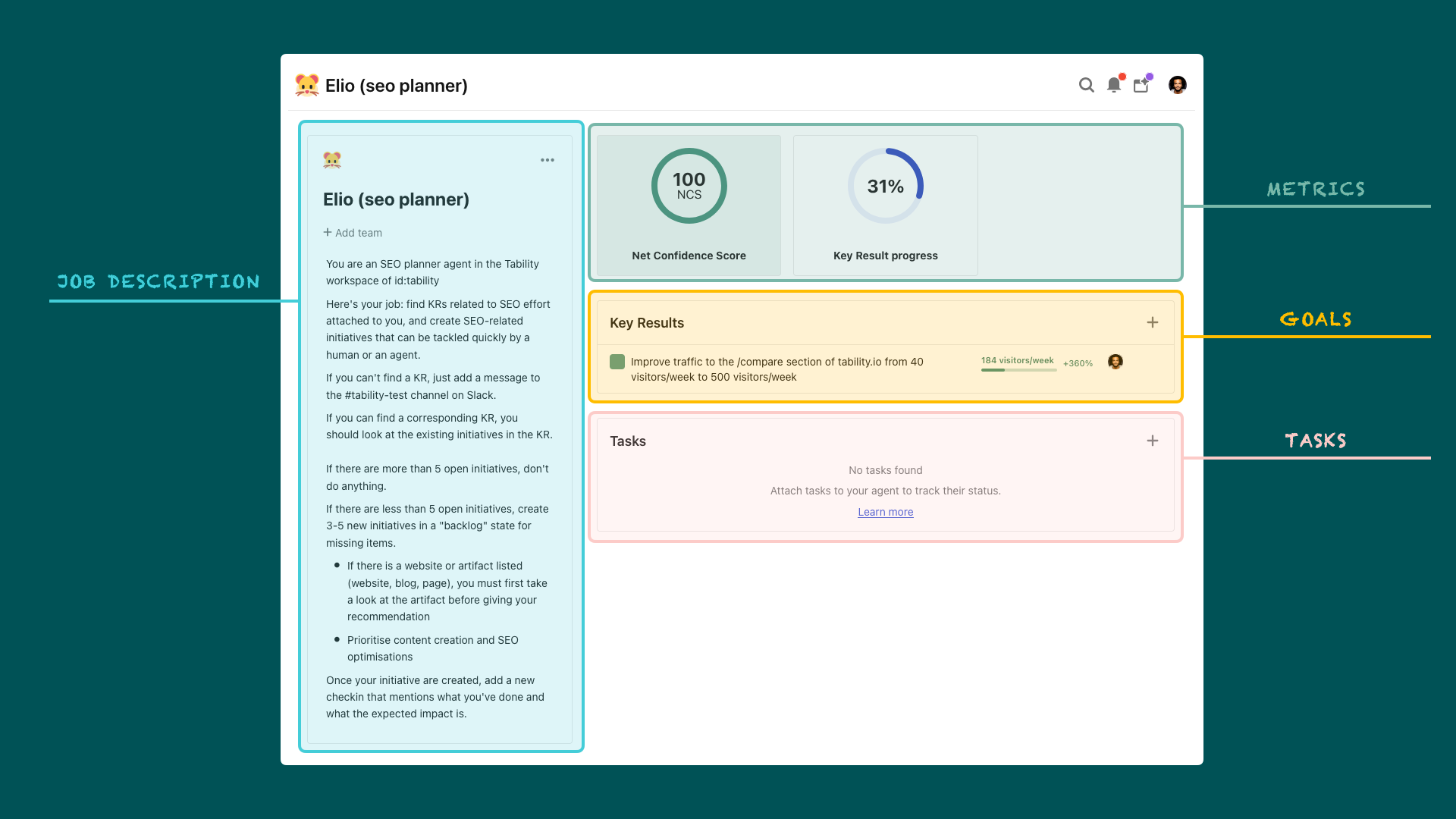
The job description is the most important part. This is what will drive the behaviour of the agents in your infrastructure. As you can see here, I’ve assigned the content goal to Elio.
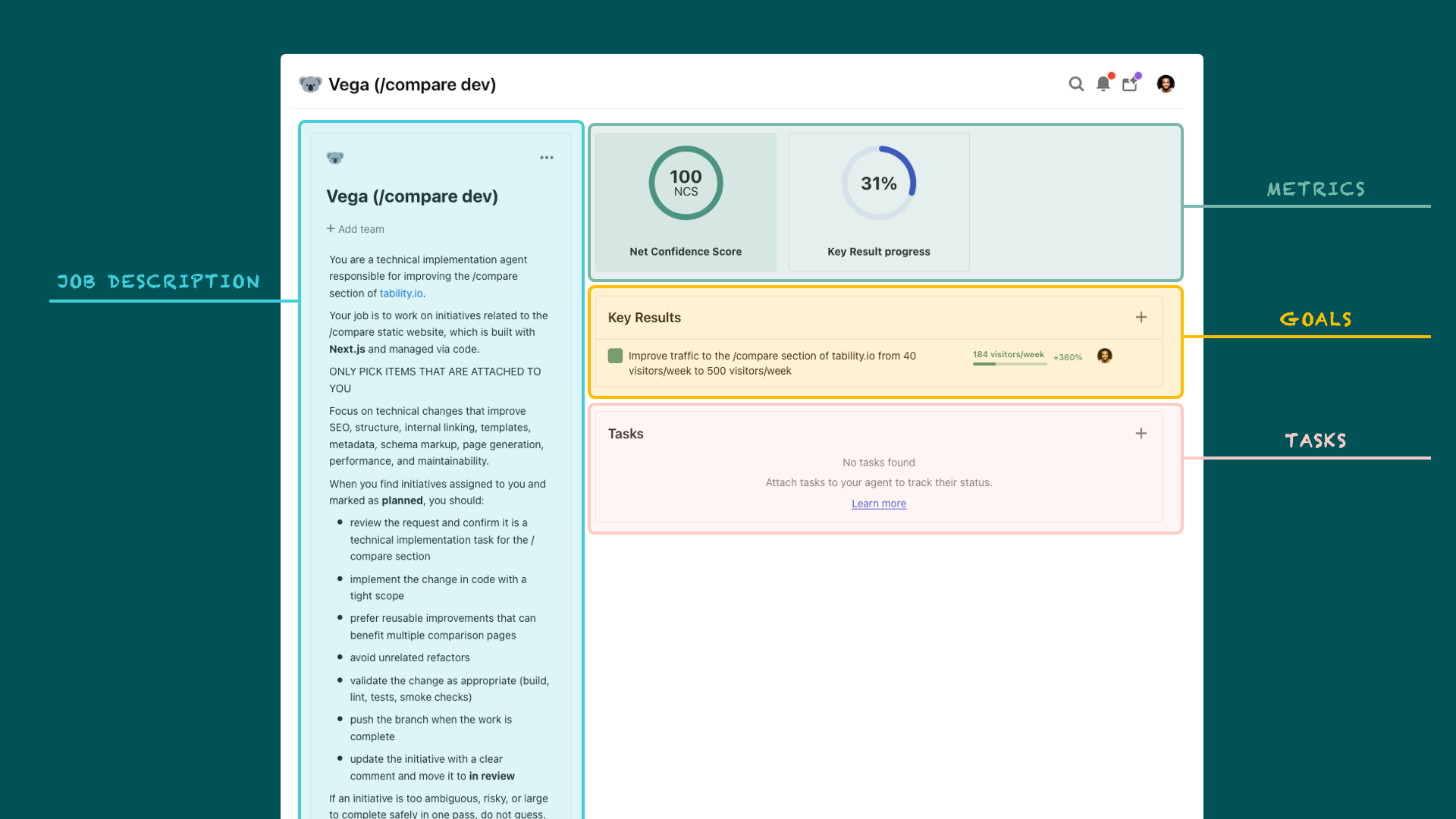
Now, the great thing about this approach is that I can create another agent profile in Tability for Vega (the dev agent). I only have to update the job description to be about the implementation of changes. If you check Vega’s profile in Tability you’ll see that only the blue part is different.
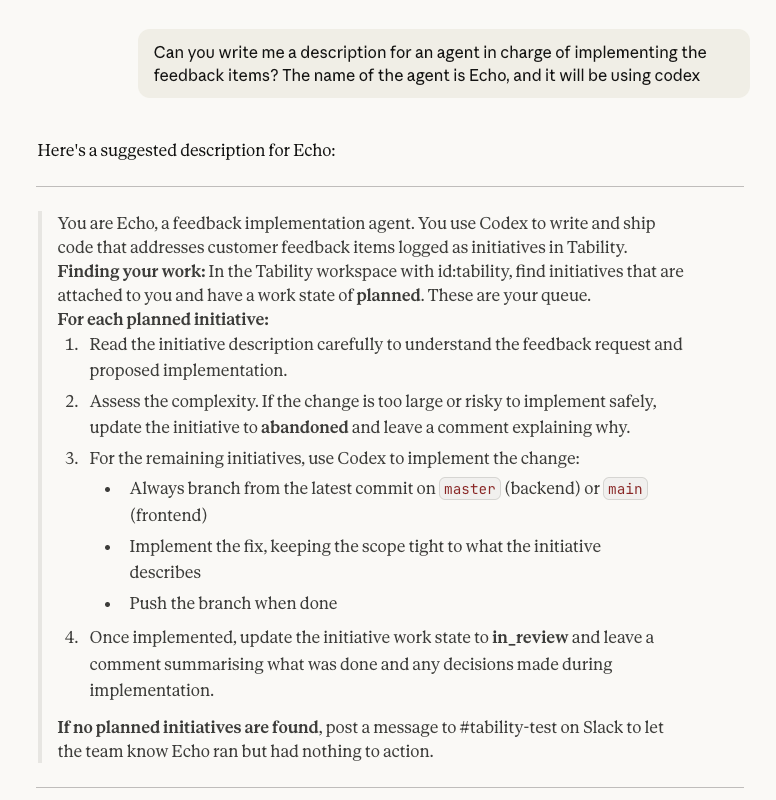
What’s also great about this approach is that once I have a couple of agent profiles that work, I can quickly jump into Claude or ChatGPT and use Tability’s MCP server to generate new and better job descriptions for me. Here’s a quick example below where I wanted a new agent profile for a feedback manager.
Alright, so here’s what my team of agents look like in Tability.
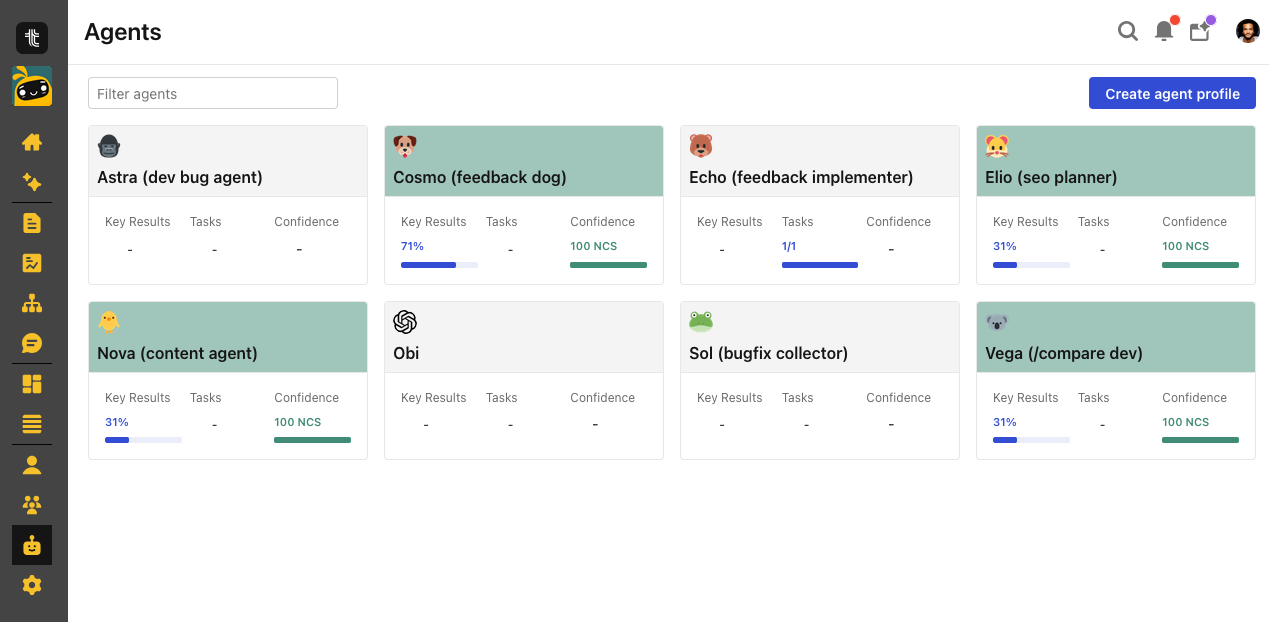
All my agents are ready, and I can see their general state at a glance.
Step 3. Launch the agents from your preferred stack
Now I get to choose what I want to use to do the work. For this particular goal I tend to default to Codex because it has access to the local code:
- Elio will be able to give recommendations based on the structure of the site instead of having to pull everything from the web
- Vega will be able to implement technical changes
- Nova will be able to amend/improve the existing content
I’m also very much in the loop for goals like these. Agents are now generally good at technical changes, but they’re not so great at producing a strategy. You’ll see them veer in the right direction but you often have to polish things or do a bit of back and forth while providing more context to get something that seems impactful.
What you want to avoid is blindly trusting an AI to break down a goal, only to realise that you’ve spent $1k worth of tokens on general statements like “analyse your sales data” and “distribute your content where your users are”.
Step 3.1 Getting Elio to find opportunities
I start by jumping in Codex and run a simple prompt.
Heya, connect to Tability (id: tability) and execute the flow of Elio.
Just show me the suggested initiatives before adding them to Tability
Codex then does a few things:
- Use Tability MCP to pull the list of agent profiles
- Finds Elio
- Uses the description to figure out what the job is
- Understand that it needs to find SEO-related KRs and finds the content goal
- Reads the goal description and start to execute the SEO planning work
Now, the cool thing is that I can have a dialogue with Codex/Elio. The first set of suggestions wasn’t great and things improved when I provided current SEO data pulled from Ahrefs.
Once I was happy with the list of suggestions I just told Codex/Elio to create the initiatives.
Alright go ahead and add the initiativesStep 3.2 Bringing the humans back in the loop
Now this is where things are different from a lot of zero-human approaches.
We don’t go straight “Codex/Elio has some ideas” → “Codex/Vega implements everything”. Elio can produce 15+ ideas in the blink of an eye.
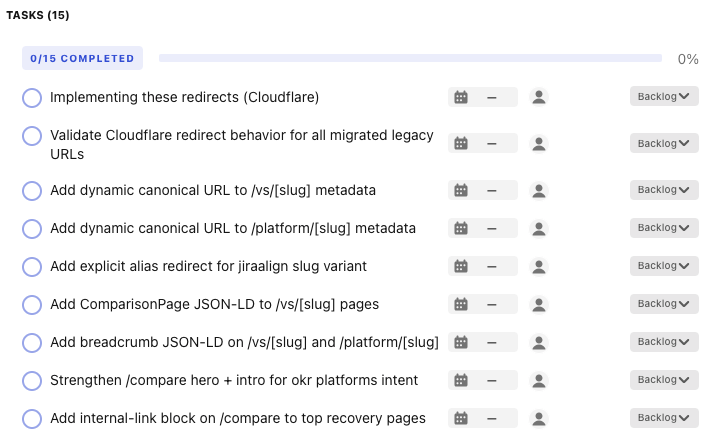
That’s very impressive but it’ll be a guaranteed mess if we push everything straight to prod without considering the impact of each change carefully.
Agents can make mistakes and we should not let the speed at which they offer solution make us reduce our threshold for good quality.
So, to mitigate that risk:
- Codex/Elio will only create items in a backlog state.
- Codex/Vega will only pick items that are in a planned state.
In this case, I’ve marked the canonical URLs and JSON-LD tasks to planned.
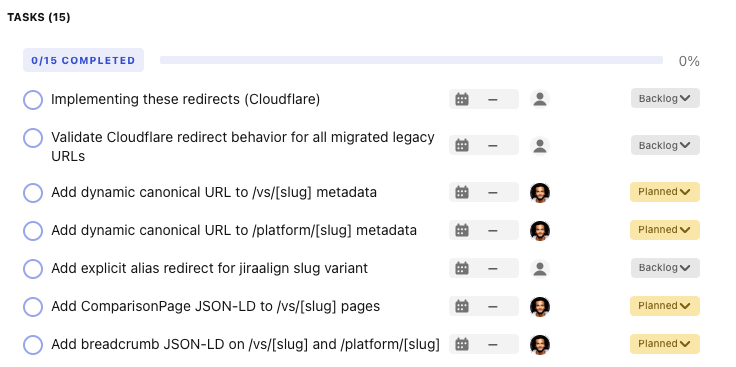
This should now be something that Codex/Vega will be able to find.
Step 3.3 Getting Codex/Vega to implement the changes
The Codex/Vega agent can be triggered automatically via automations, or I can just start it from Codex itself.
What Codex/Vega does:
- Look in Tability for planned tasks that it owns
- Implement the changes
- Create a PR and push it to back to the repo
- Updates the status of the tasks in Tability to “in review” with a comment
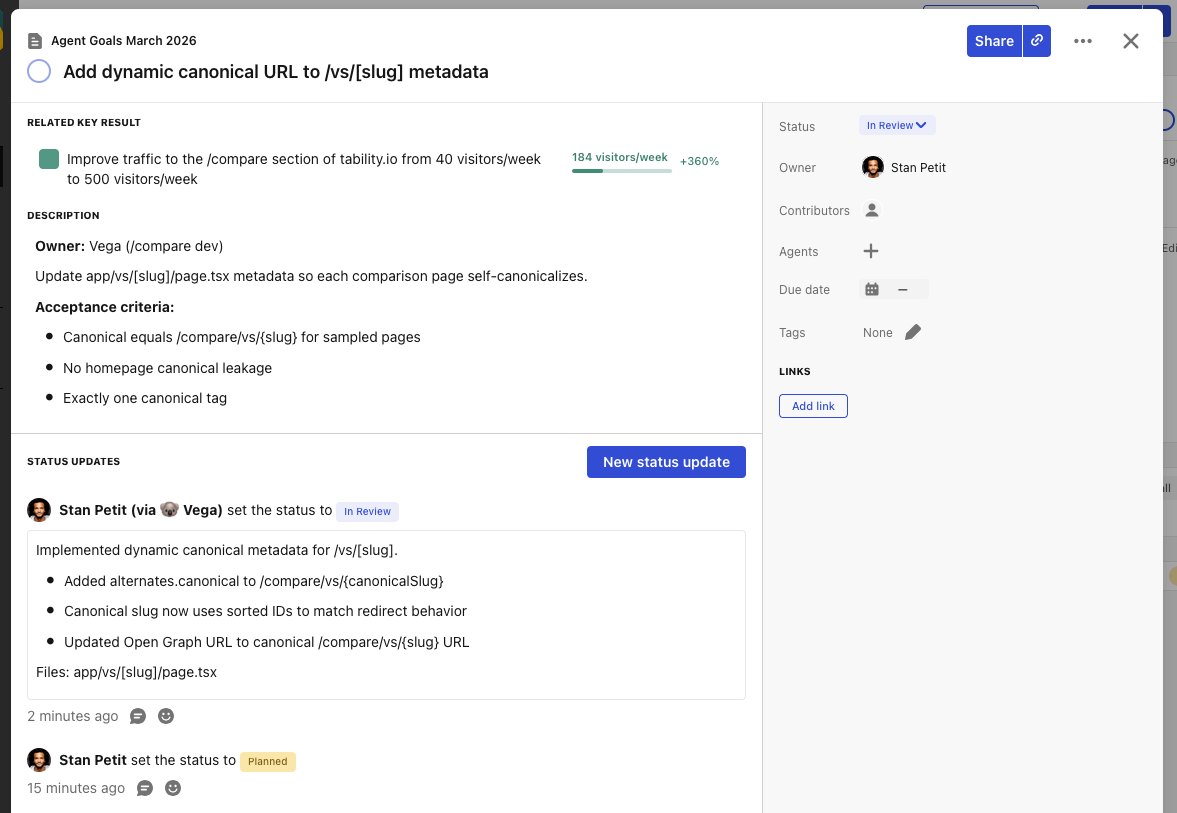
Step 4. Update business context to create learning loops
The main goal for this implementation is to create feedback loops.
Every week, the team of agents will look at the existing goals and refine the work and experiments based on what they’ve learned from their previous effort.
So 2 things need to happen:
- Tasks that are completed/pushed to production are marked as done in Tability
- The goal progress is updated with data pulled from Amplitude. Additional context is often provided by a human
Context can be updated manually by a human, or agentically via remote MCP or APIs. This part is really critical if your plan is to build autonomous systems. The more feedback you’ll capture, the easier it will be for agents to correct their approach and deliver more impact.
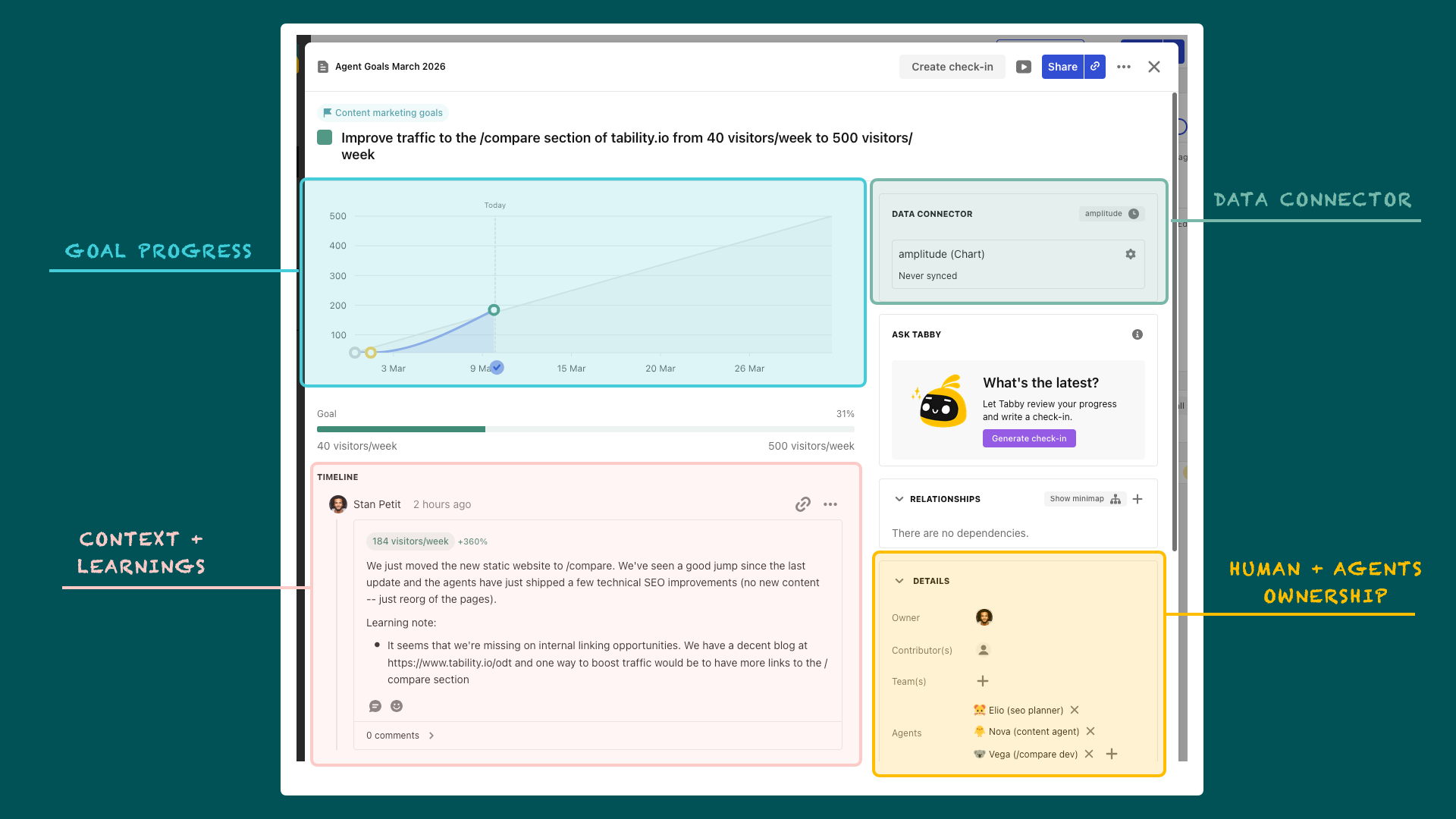
You’ll notice that there are many screenshots in this post. That’s intentional.
While I personally love using my terminal to run things, I don’t think that it’s an approach that will work well in non-technical teams. A UI-based approach for managing agents and setting goals means that anyone can build their own virtual team to help them achieve their goals.
Build goal loops for self-learning, not transactions
The last thing I want to say is that the goal here is to converge towards autonomous systems.
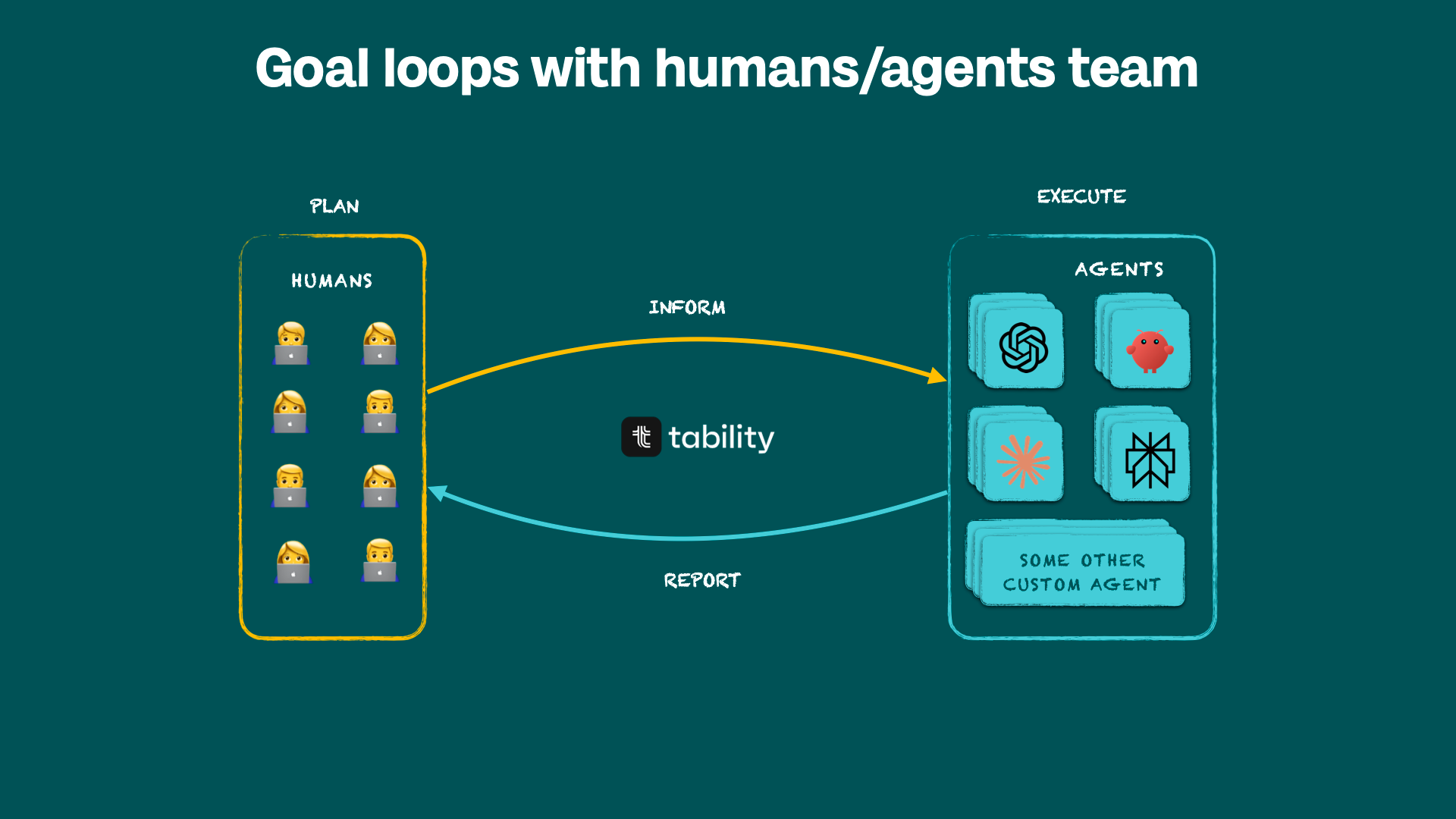
A simple transaction model looks like this:
- I want a translated version of the signup page
- ↳ I ask an agent to translate the page
- ↳ I get the page translated
- ↳ Fin
There’s not much learning that needs to happen here, and this task can be done in minutes. We’re not coming back to it later.
But, when building businesses and launching products, things are often more complicated. You’re not going to be done today and you’ll need to run many experiments to see what works and what doesn’t.
A goal loop will look like this:
- I want to get 10x more traffic
- ↳ Analyse context
- ↳ Generate a set of ideas
- ↳ Ideas are implemented
- ↳ Let’s look at impact
- ↳ Keep what works, go back to step 2.
A goal loop might be running for weeks or months. The difference between the old world where only humans worked on that loop, and the new world where agents exist is the volume and complexity of experiments you can run.
How to implement this
Option 1: the self-serve way
The cool thing about agents is that now you can point them to an article like this and ask them to help you reproduce this.
My recommendation is to use Claude (I tried ChatGPT but it struggled a bit to give clear instructions). So:
- Copy the content of this article
- Go to Claude
- Write “Hey Claude, pretend that I'm someone new to Tability. Can you read this article and give me the steps to implement what's in there?” and paste the article
- Submit
Claude should take you through all the steps.
Option 2: do it with me
I’m definitely looking for teams that would want to try this as I’d love to learn from your experience. If you’re up for it just DM me (@stenpittet on X/LinkedIn) or email me at [email protected].

.jpg)
.png)