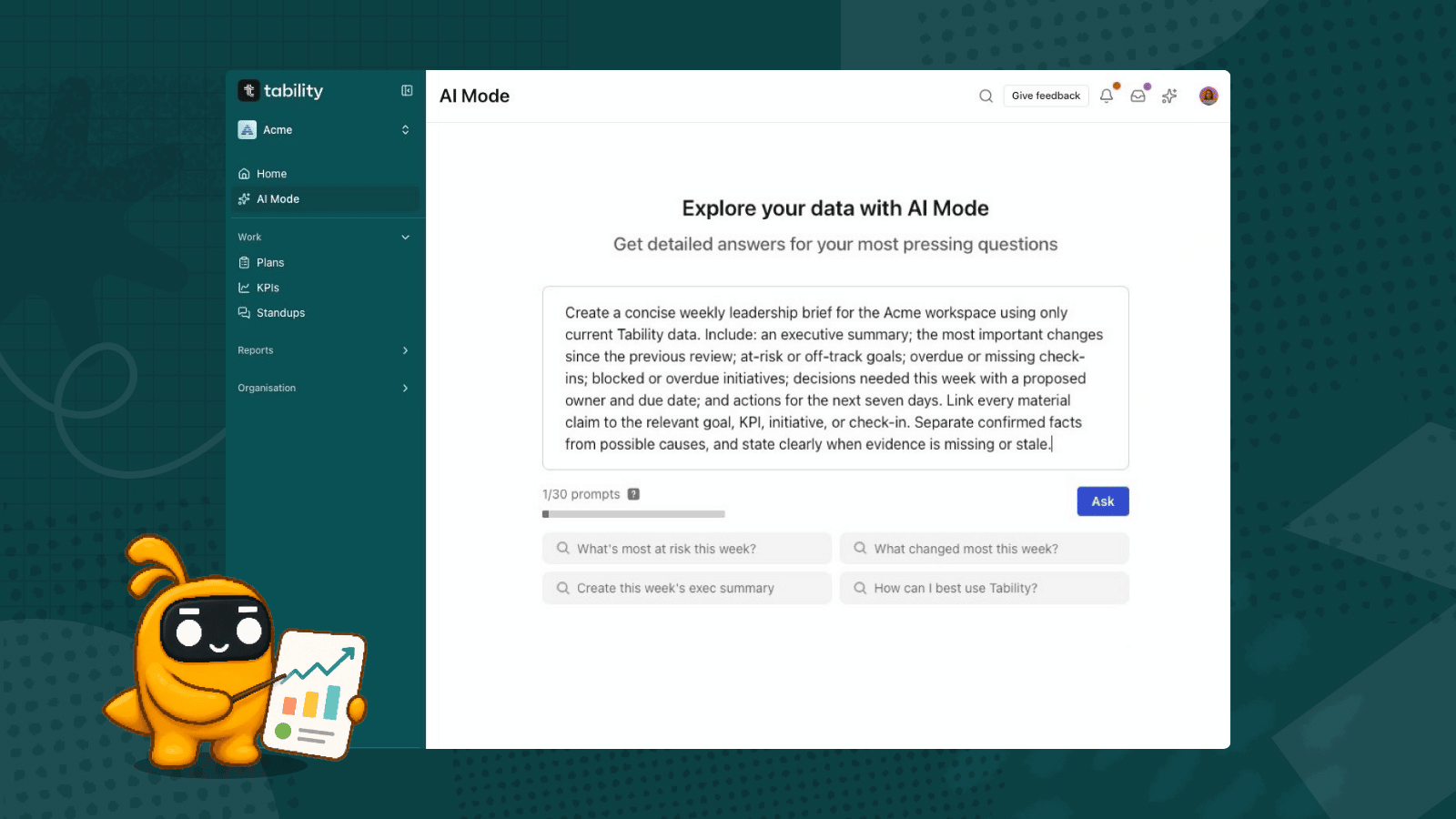
Ein Weekly Business Review (WBR) ist ein kurzes Steuerungsmeeting, das jede Woche dieselben Kernkennzahlen nutzt, um zu entscheiden, wo Führungskräfte handeln müssen. Ein nützlicher WBR liefert mehr als nur Zahlen: Er zeigt, was sich geändert hat, warum es sich geändert hat, welche Ziele gefährdet sind und welche Entscheidungen nicht warten können.
Tability kann das Briefing vor dem Meeting aus den Zielen, KPIs, Initiativen und Check-ins erstellen, die bereits in deinem Workspace vorhanden sind. Speichere die Anfrage als Scheduled prompt, wähle eine wöchentliche Uhrzeit und Empfänger aus und überprüfe das generierte Briefing dann vor dem Meeting anhand der verknüpften Belege.
Voraussetzungen
Du brauchst ein Tability-Konto – starte hier eine kostenlose Tability-Testversion.
Hinweis: Scheduled prompts können Fehler machen. Behandle den generierten WBR als Entscheidungshilfe. Halte deine Workspace-Daten aktuell und überprüfe wichtige Aussagen anhand der verknüpften Tability-Elemente.
Was sollte ein Weekly Business Review enthalten?
Nutze ein stabiles Scorecard-Format, damit das Team diese Woche mit der letzten vergleichen kann. Das Briefing sollte sechs Fragen beantworten:
- Welche Geschäftskennzahlen haben sich wesentlich verändert?
- Welche Ziele sind auf oder von Kurs abgekommen?
- Welche Check-ins fehlen oder sind zu alt, um ihnen zu vertrauen?
- Was hat die wichtigsten Veränderungen verursacht?
- Welche Risiken oder Blocker erfordern ein Eingreifen?
- Welche Entscheidungen brauchen einen Verantwortlichen und eine Frist?
Ein kompakter WBR funktioniert besser als eine ausführliche Dashboard-Tour. Nimm nur die Kennzahlen und Ziele auf, die im Meeting eine Entscheidung beeinflussen können.
Felder der wöchentlichen Scorecard
- Scorecard: aktueller Wert, Ziel, Trend und vorheriger Wert — deutliche Bewegung oder wachsende Zielabweichung
- Gefährdete Ziele: Fortschritt, Konfidenz, letzter Check-in und verbleibende Zeit — Korrekturmaßnahme oder Zielüberprüfung nötig
- Initiativen: abgeschlossene Arbeit, laufende Arbeit und blockierte Arbeit — fortsetzen, ändern, stoppen oder eskalieren
- Datenqualität: fehlende Kennzahlen und überfällige Check-ins — Belege müssen vor der Entscheidung aktualisiert werden
- Entscheidungen: Entscheidung, Verantwortlicher, Fälligkeitsdatum und unterstützende Belege — klares Commitment vor Ende des Meetings
Bereite deinen Tability-Workspace vor
Das geplante Briefing kann nur Belege nutzen, die in deinem Workspace verfügbar sind. Bevor du den WBR automatisierst:
- füge die Ziele und KPIs hinzu, die in die wöchentliche Scorecard gehören
- stelle sicher, dass jede Kennzahl einen aktuellen Wert und ein Ziel hat
- bitte die Verantwortlichen, ihre neuesten Check-ins vor dem Meeting zu veröffentlichen
- halte Initiativenstatus und Blocker aktuell
- verwende eindeutige Plan- und Teamnamen, damit der Prompt den richtigen Geltungsbereich erkennen kann
Wenn ein kritisches Signal nur in einem anderen System existiert, verbinde es mit Tability oder aktualisiere es, bevor das Briefing läuft. Bitte den Prompt nicht, fehlende Daten zu erfinden.
Kopiere diesen Weekly-Business-Review-Prompt
Ersetze den Text in Klammern durch deinen Plan, dein Team und deinen Berichtszeitraum.
Starte mit einem Plan oder einem Führungsteam. Ein präziser Geltungsbereich liefert ein nützlicheres erstes Briefing und macht es leichter, fehlende Belege zu erkennen.
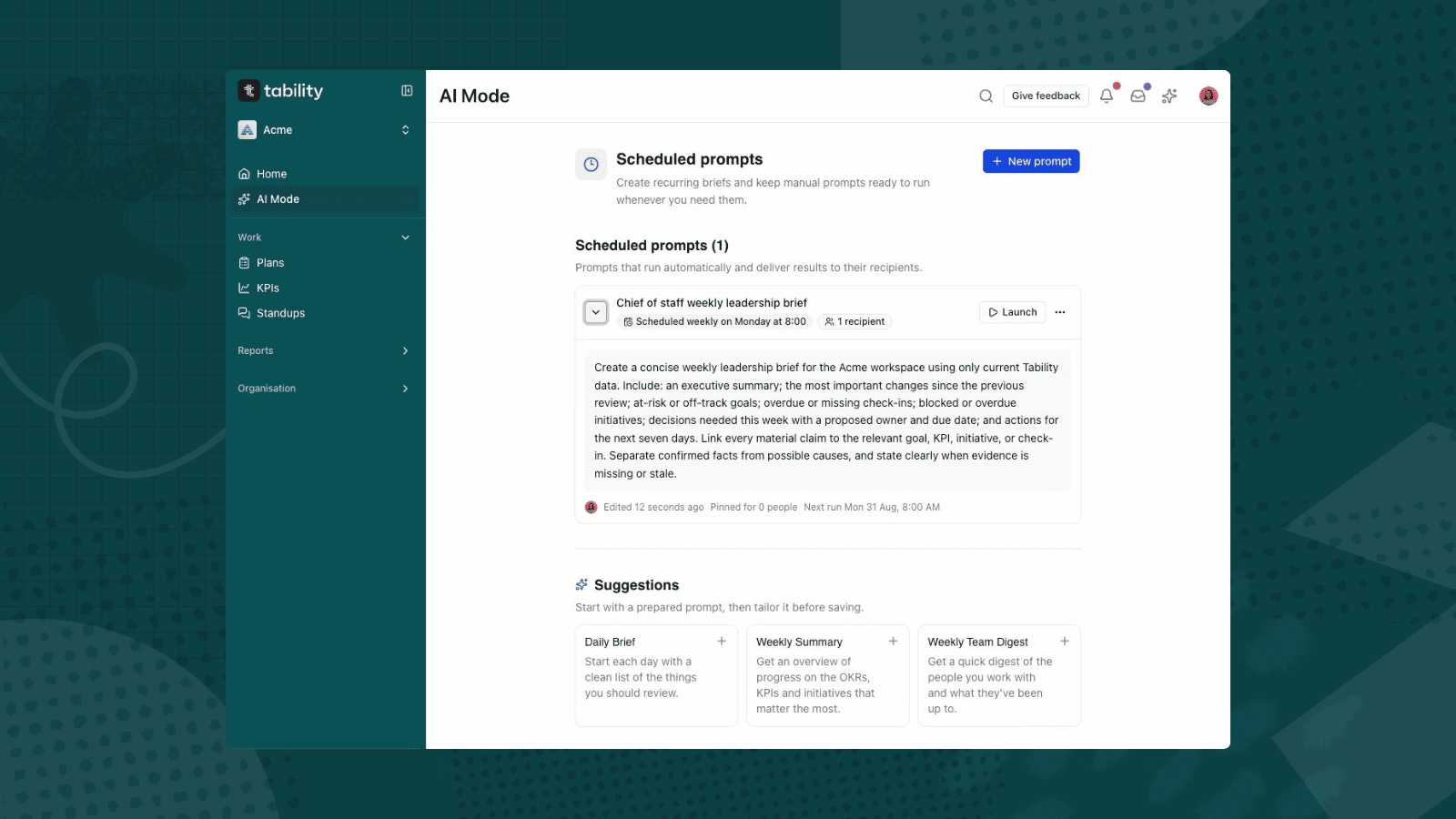
Plane das wöchentliche Briefing
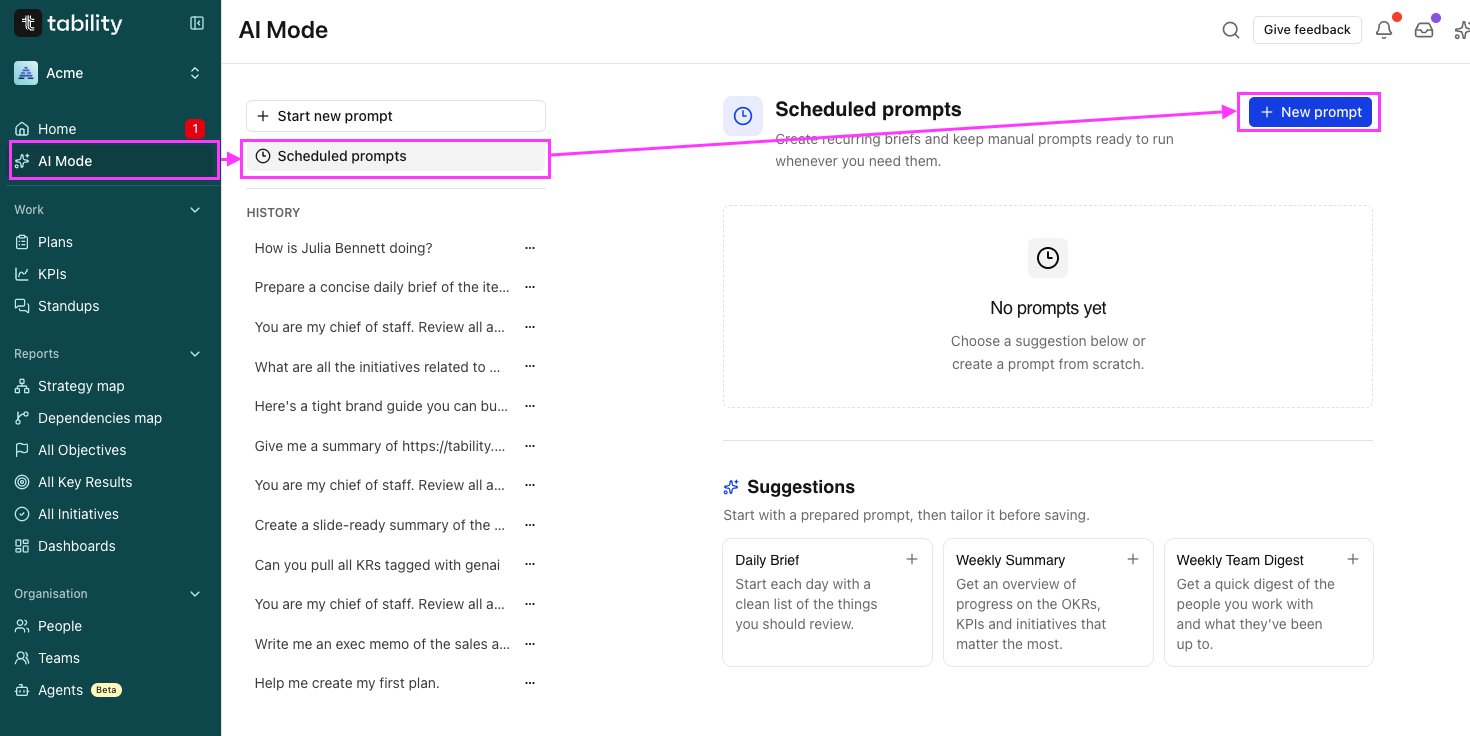
- Öffne AI Mode in der Tability-Seitenleiste.
- Wähle Scheduled prompts.
- Klicke auf New prompt. Du kannst auch mit der Vorlage Weekly Summary starten.
- Gib dem Prompt einen erkennbaren Titel, zum Beispiel Weekly Business Review am Montag.
- Füge den obigen Prompt ein und ersetze den Geltungsbereich in Klammern.
- Stelle Schedule auf Weekly.
- Wähle Wochentag und Uhrzeit. Plane es früh genug, damit Verantwortliche fehlende Informationen vor dem Meeting korrigieren können.
- Füge die Workspace-Mitglieder hinzu, die das Briefing erhalten sollen.
- Überprüfe das angezeigte Datum, die Uhrzeit und die Zeitzone des Workspace für den nächsten Lauf.
- Klicke auf Save prompt.
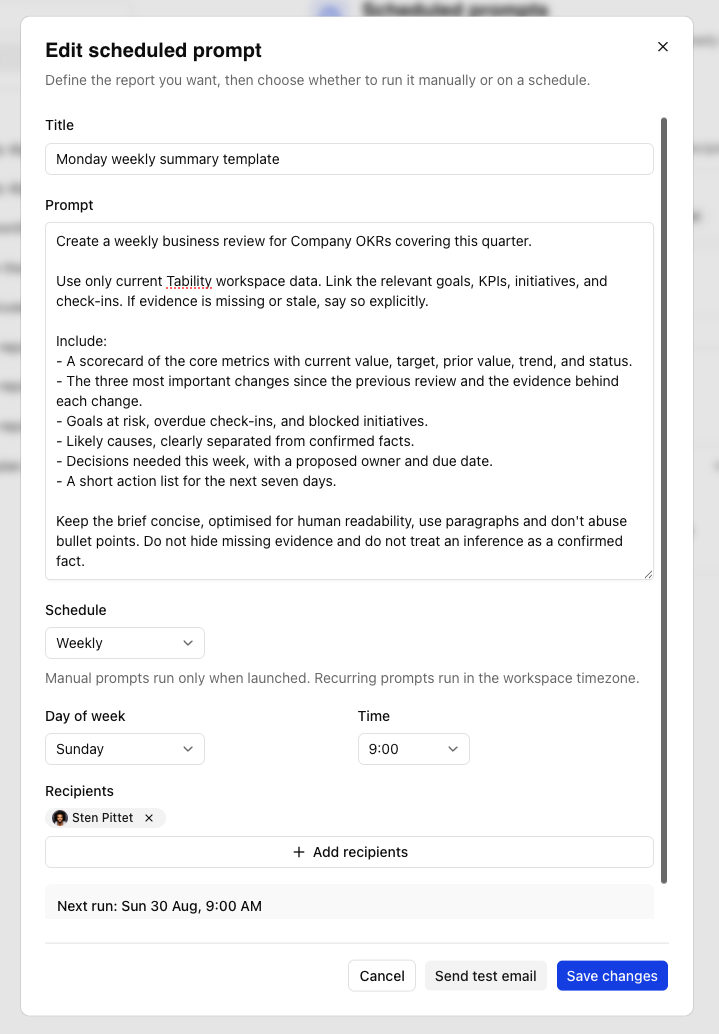
Tability erfordert mindestens einen Empfänger für einen wiederkehrenden Prompt. Das geplante Ergebnis wird aus dem Workspace generiert und per E-Mail an die ausgewählten Empfänger gesendet. Dein angezeigtes AI-Mode-Kontingent und die Workspace-Berechtigung bestimmen, ob ein Lauf zugestellt werden kann.
Überprüfe den ersten generierten WBR
Verlass dich nicht auf den Zeitplan, bevor du nicht ein vollständiges Ergebnis geprüft hast.
Sobald dein Scheduled prompt gespeichert ist, findest du eine neue Schaltfläche zum Senden einer Test-E-Mail.
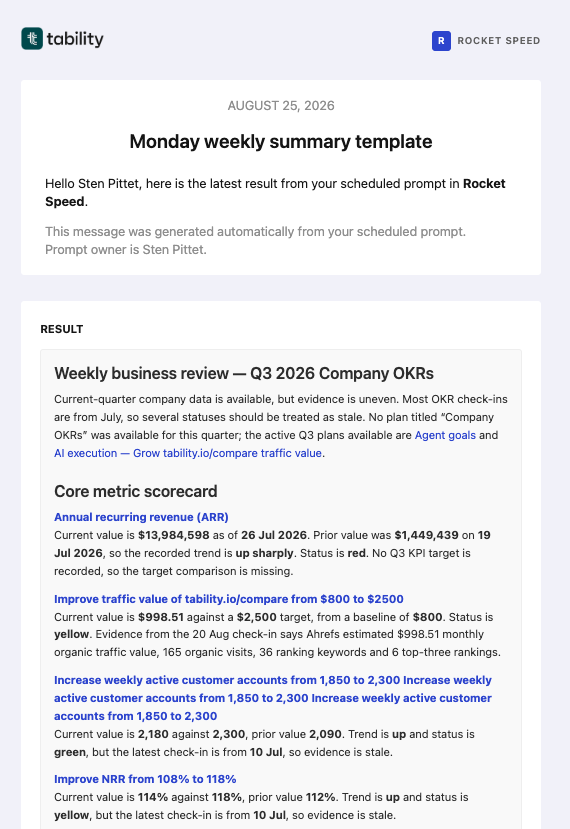
Prüfe Folgendes:
- jede Kennzahl gehört zum vorgesehenen Plan oder Team
- aktuelle Werte und Ziele stimmen mit den verknüpften Tability-Elementen überein
- Veränderungen werden mit dem richtigen Vorzeitraum verglichen
- gefährdete Ziele enthalten die aktuellste verfügbare Konfidenz und den letzten Check-in
- bestätigte Fakten sind klar von möglichen Ursachen getrennt
- fehlende oder veraltete Belege werden benannt, statt mit Annahmen aufgefüllt zu werden
- jede vorgeschlagene Entscheidung enthält genug Belege, damit ein menschlicher Verantwortlicher handeln kann
Wenn das Briefing zu breit ist, grenze Plan, Team, Zeitraum oder Anzahl der Kennzahlen im Prompt ein. Wenn wichtiger Kontext fehlt, aktualisiere die zugrunde liegenden Tability-Daten, bevor du weitere Prompt-Anweisungen hinzufügst.
Führe das Meeting anhand von Entscheidungen, nicht von Status-Updates
Sende das Briefing vor dem OKR Meeting und bitte die Teilnehmenden, es vorab zu lesen. Während des WBR:
- Korrigiere jedes wesentliche Datenproblem.
- Besprich Kennzahlen oder Ziele, die sich stark genug verändert haben, um Maßnahmen zu erfordern.
- Löse die wirkungsvollsten Blocker.
- Halte Entscheidungen, Verantwortliche und Fälligkeitsdaten fest.
- Aktualisiere das betreffende Tability-Element, damit das Briefing der nächsten Woche die Entscheidung enthält.
Das macht den WBR zu einem geschlossenen Kreislauf: laufende Arbeit erzeugt Belege, das Briefing identifiziert Ausnahmen, das Meeting trifft Entscheidungen, und diese Entscheidungen verbessern die nächste Review.
Wann du den WBR nicht automatisieren solltest
Halte den Prozess manuell, bis:
- die Scorecard stabile Kennzahlendefinitionen hat
- Verantwortliche konsequent Updates veröffentlichen
- sich das Team auf die Entscheidungen einigt, die das Meeting unterstützen soll
- wichtige Geschäftsdaten in Tability verfügbar sind
Automatisierung kann kein unklares Betriebsmodell reparieren. Starte mit einer kleinen, vertrauenswürdigen Scorecard und erweitere sie erst, wenn das Briefing wiederholt bessere Entscheidungen unterstützt.
Starte deinen ersten geplanten Review
Erstelle einen Plan, füge die Kennzahlen hinzu, die dein Führungsteam jede Woche prüft, und plane den Prompt erst, wenn die Daten bereit sind.

.jpg)